


An Incorporation Certificate is a document that shows your company or LLP is officially registered in India. After registration, you can download this certificate from the MCA (Ministry of Corporate Affairs) website using the “Get Certified Copies” option. This certificate is valid as legal proof of your business and shows details like the company name, CIN/LLPIN, registration date, etc. It is commonly required for opening bank accounts, applying for licenses, and completing various compliance or government-related procedures for your company.
What is an Incorporation Certificate?
An Incorporation Certificate is also called a Certificate of Incorporation. It is an official document issued by the ROC, which works under the Ministry of Corporate Affairs (MCA). It confirms that a company has been registered and recognised as a legal corporate entity. In India, this registration is done under the Companies Act, 2013.
This certificate proves that the company is officially formed and allowed to do business. It also means the company’s name is entered in the official list of registered companies maintained by the ROC.
Format of a Certificate of Incorporation
The certificate contains important information that proves the company is legally registered, such as—
- Company Details:
This includes the company’s name, registered office address, and type of company structure.
- Registration Number:
The registration number on the Certificate of Incorporation (COI) is also called the Corporate Identification Number (CIN) for companies or the LLP Identification Number (LLPIN) for LLPs. It is a unique alphanumeric code given to the company at the time of registration.
- Date of Incorporation
It is the official date on which the company or LLP was legally registered. It shows when the company started and is often needed for paperwork, compliance, and verification.
- PAN & TAN Details of the incorporated company
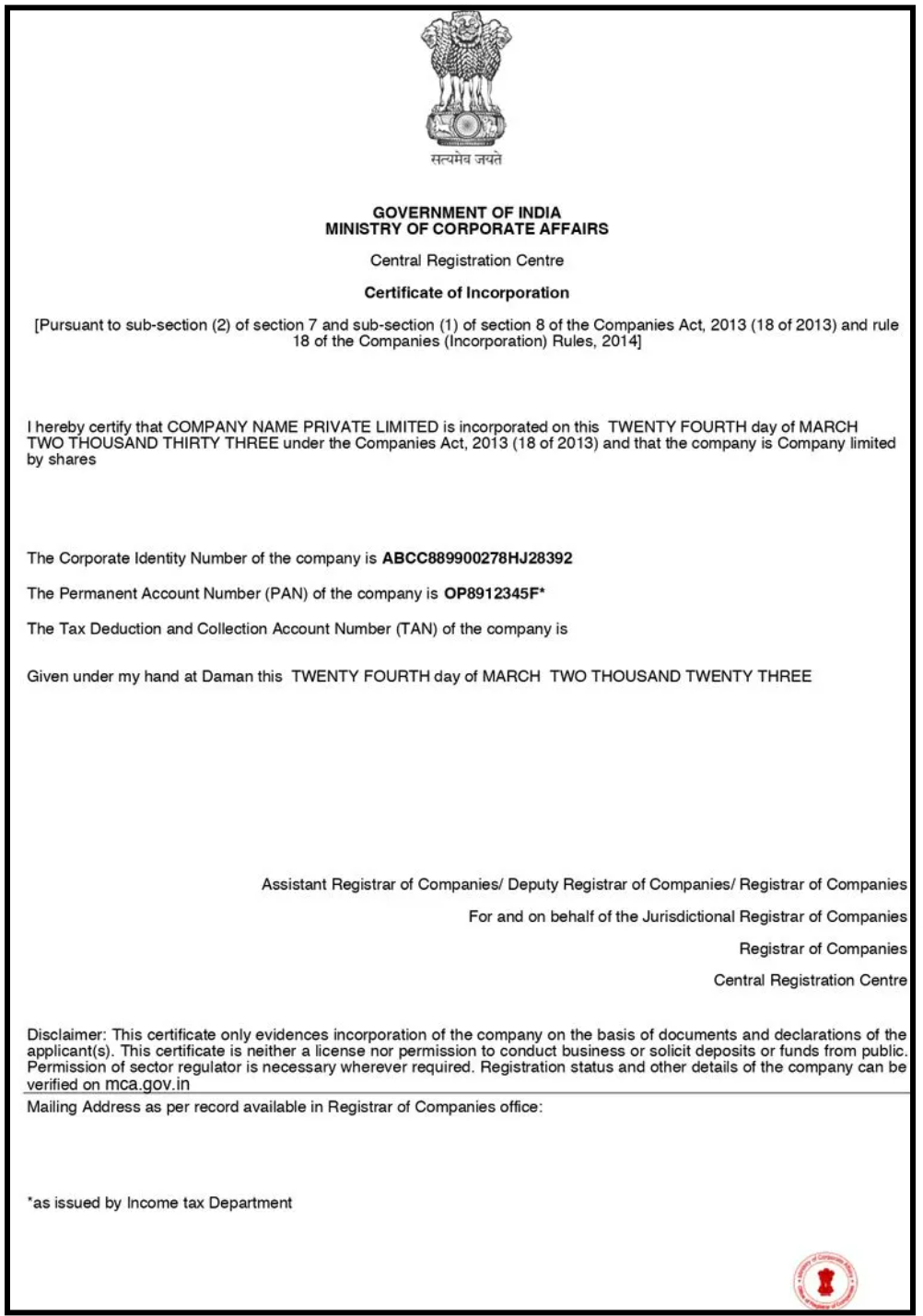
It includes the company’s TAN (Tax Deduction and Collection Account Number) and PAN (Permanent Account Number). These numbers are essential for handling tax work, filing returns, and doing financial transactions for the company.
Format of the Registration Number
The 21-digit CIN number looks like this – U72200DL2014PTC098765. It is made in this format:
- The first digit tells if the company is listed (L) or unlisted (U).
- The next five digits show the industry code.
- The next two digits show the state code where the company is registered.
- The next four digits show the year in which the company was incorporated.
- The following three letters show the type of company (Private Limited Company – PTC, Public Limited Company – PLC).
- The remaining digits are a unique code given to each company.
For an LLP, the registration number is called LLPIN (Limited Liability Partnership Identification Number). It is a unique 7-digit code issued to the LLP when it is registered with the ROC. An LLPIN can look like this- AAF-2134.
Benefits of Downloading the Incorporation Certificate Online
Here are the main reasons to download the Incorporation Certificate online: it is fast, easy, and lets you get important company details anytime without going to a government office or dealing with paperwork:-
- Opening a Bank Account
To open a company bank account, you need the Incorporation Certificate for KYC. This certificate helps the bank confirm the company’s identity before opening a current account.
- Legal Compliance
It is used for many government filings. Companies use it for GST registration, income tax work, and other legal requirements. It also proves that the company is officially registered.
- Business Deals and Tenders
When companies take part in tenders or make agreements with vendors, they need to give the Incorporation Certificate to show they are legally registered. This proof is needed for government and private contracts.
- Checks by Investors and Auditors
The certificate shows the company is legal. Investors and auditors need this information before giving funds or doing an audit.
- Licenses and Government Benefits
For business licenses, permits, or government benefits like MSME or Startup India, companies must submit their Incorporation Certificate. It shows the company is officially registered.
- International Transactions
If the company has to deal with foreign clients or banks, the Incorporation Certificate is used to prove that the business is officially registered in India.
- Certificate is Lost or Damaged
If the original certificate is lost or damaged, the downloaded digital copy can serve as a quick replacement. It helps avoid delays in company work.
Prerequisites for Downloading the Incorporation Certificate Online
If you want to download the company registration certificate online, you need to make sure you meet the basic requirements given below:
- MCA Website Login
You must have login details (username and password) for the MCA website. This login allows you to enter the portal and access official company documents safely and securely online.
- Company Identification Number (CIN)
You need the CIN (Company Identification Number) to search and download the certificate. The CIN helps the portal easily find the right company from many registered business.
- Basic Company Details
You may need to provide basic details like the company name and the director’s information to help verify and locate the correct company.
- Digital Signature
Sometimes, you may need a Digital Signature Certificate (DSC) to verify your identity online before downloading the document.
- Browser and Internet
You need an updated browser like Google Chrome or Microsoft Edge. A stable internet connection helps avoid errors during the download.
Documents Required to obtain a COI in India
These are some following documents which are given below:
Identity Proof and Address Proof
You may need to provide basic identity and address documents, such as:
- PAN Card (for tax identity)
- Passport, Aadhaar Card, Voter ID, or Driver’s License of the Directors/Partners/Subscribers (for identity proof)
- Utility bills or bank statements (for address proof)
These documents help confirm the company’s owners and official address.
Proof of Registered Office
You may need to show documents that prove the company’s office address. This includes:
- a. Ownership Proof: A utility bill, such as an electricity bill or property tax receipt (not older than 30 days).
- Right to Use the Property: A Rent Agreement or an NOC from the property owner that allows the company to use the office space.
These documents help the authorities verify where the company is officially located.
Articles of Association (AOA) and Memorandum of Association (MOA)
Articles of Association (AOA) and Memorandum of Association (MOA) are required for registering companies such as Private Limited, One Person Companies, and Public Limited Companies.
- A declaration and consent letter from the proposed Directors, Partners, and Nominees agreeing to take their roles in the company.
How to Download the Incorporation Certificate Online?
The following are the steps to download the Incorporation Certificate online:
Step 1: Sign in to the MCA website
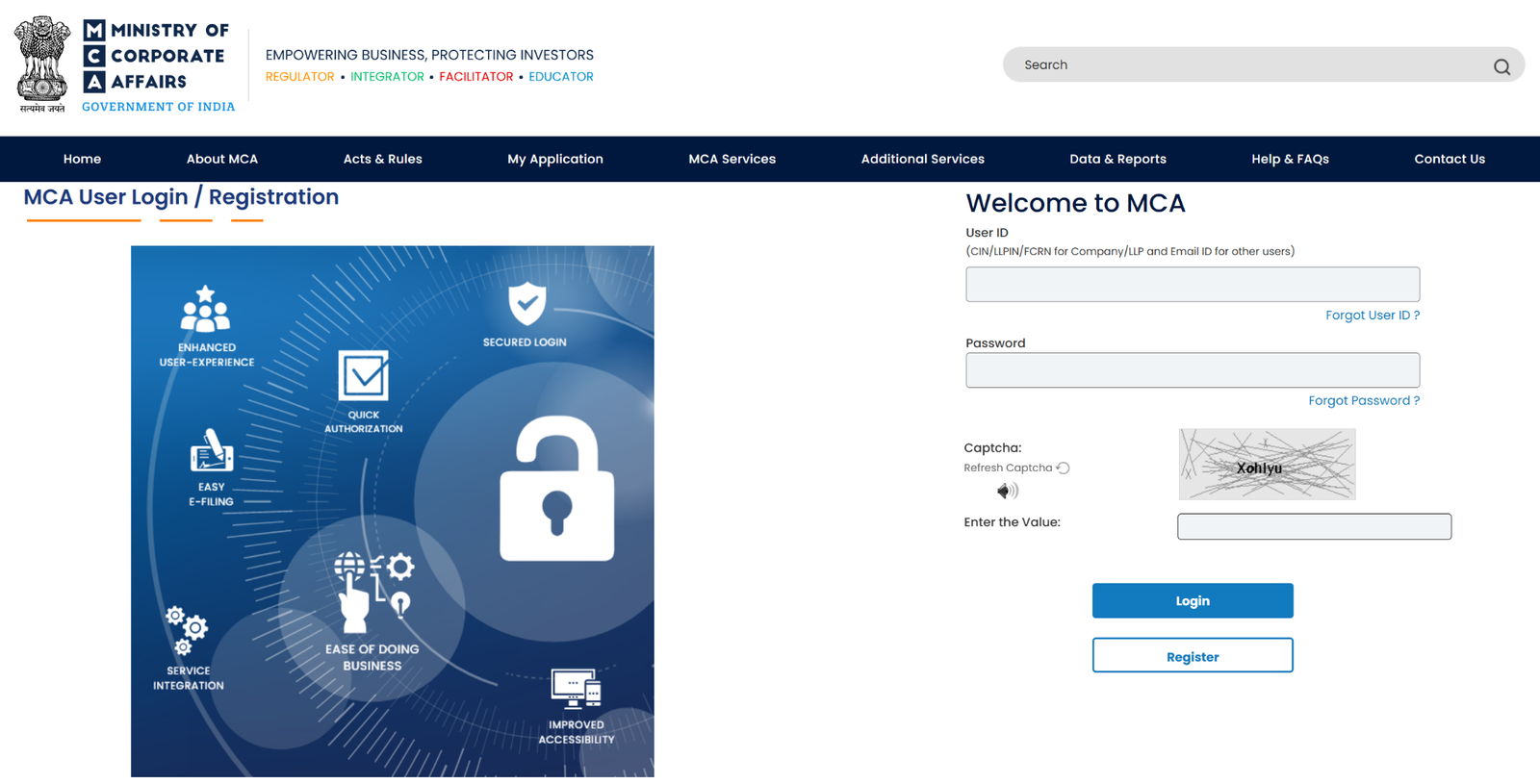
Go to the MCA (Ministry of Corporate Affairs) website and log in by using your User ID and Password. After logging in, you can safely use the different services available on the portal.
Step 2: Get Certified Copies
You need to go to the top menu and click on the “MCA Services” tab. Then select “Get Certified Copies” from the dropdown. This section lets you request official company documents.
Step 3: Find Your Company
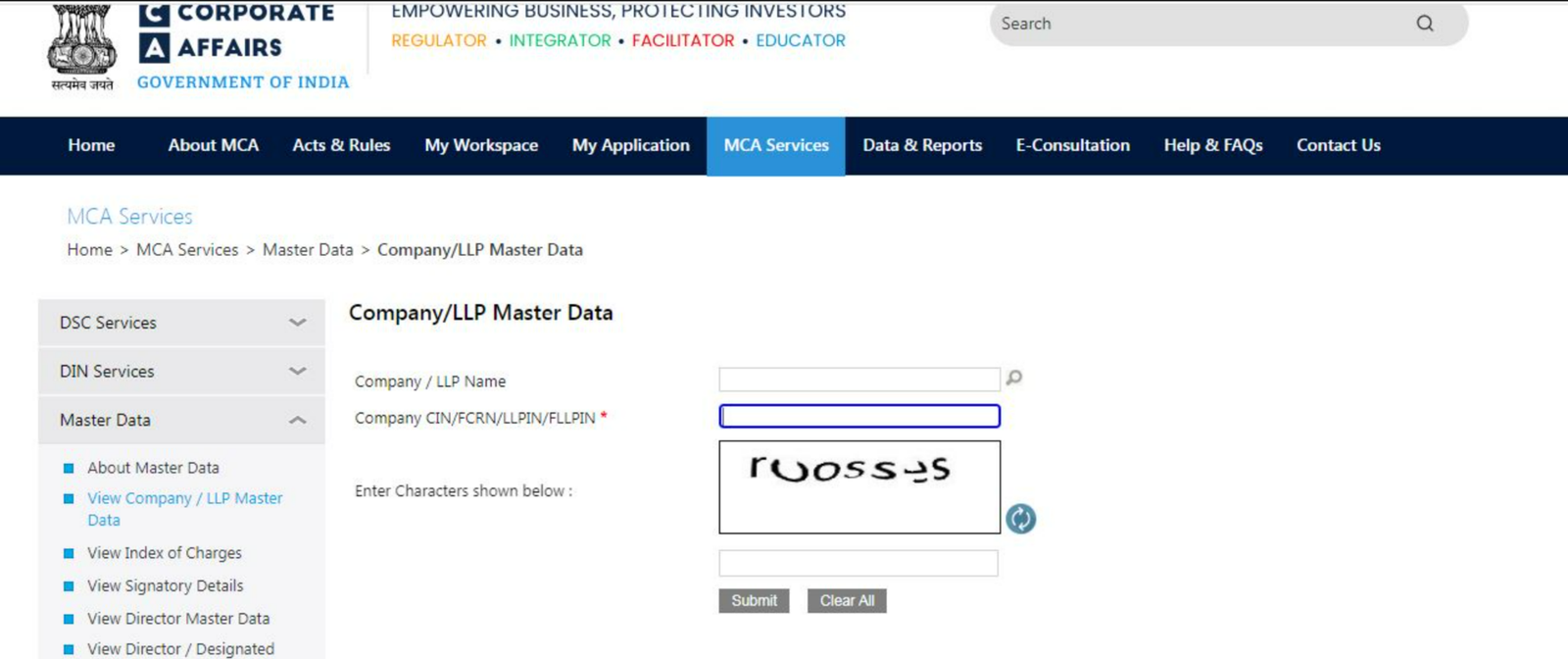
Enter your company’s CIN (Corporate Identification Number) or the exact company name in the search box. After this, the portal will find and display your company details for verification.
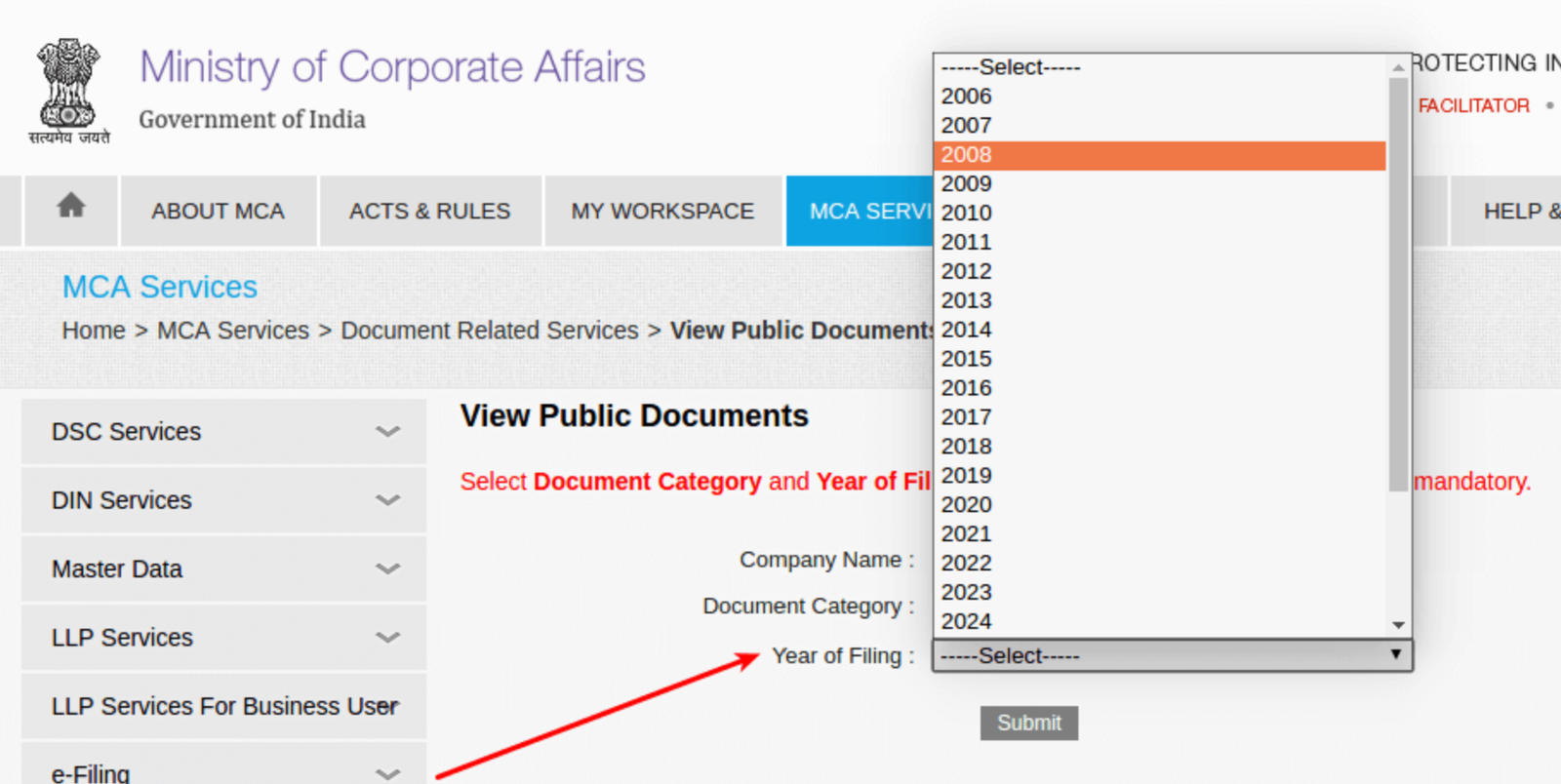
Step 4: Choose the Document and Year
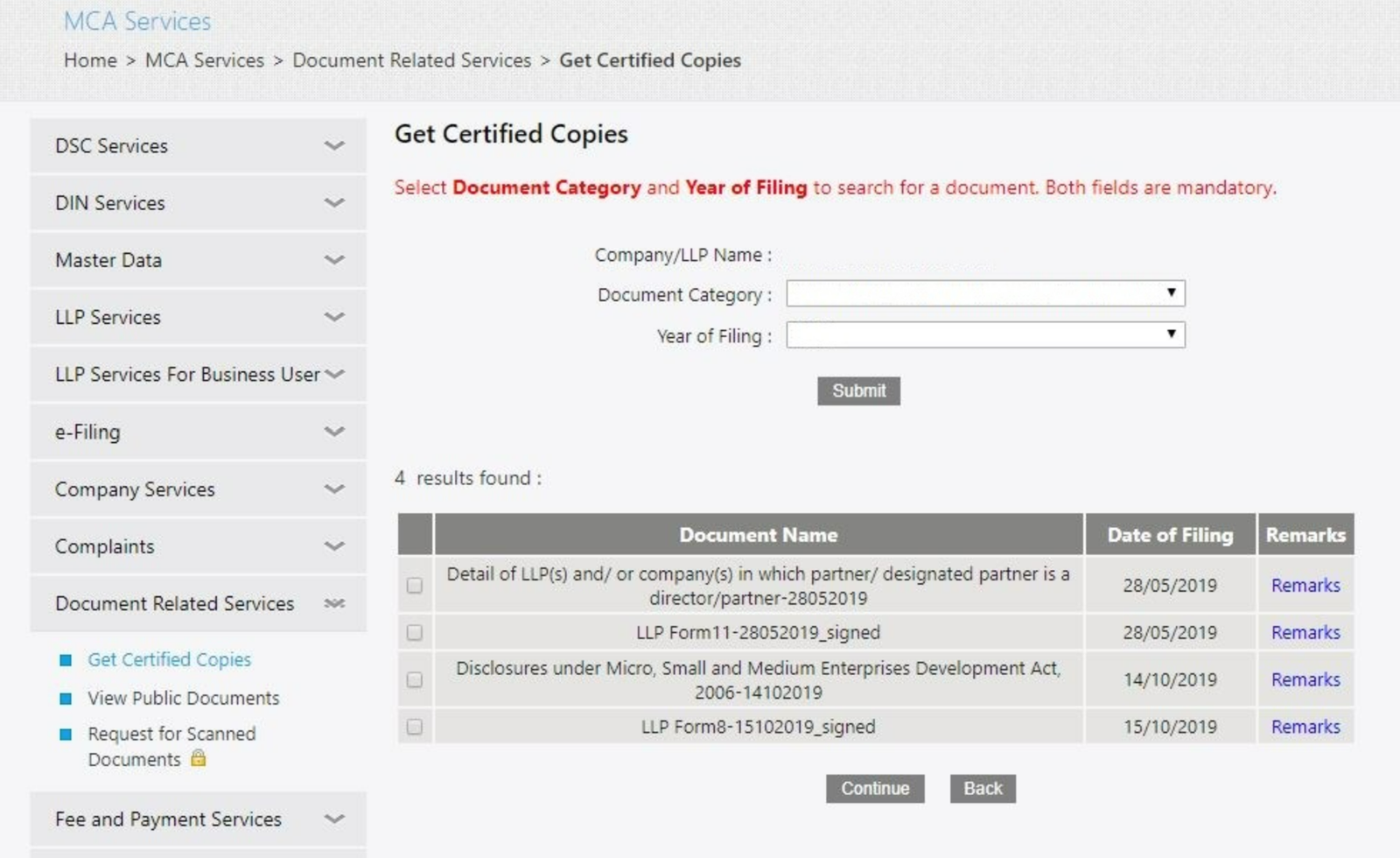
You need to choose the type of document you want, such as the Certificate of Incorporation. Then select the year in which it was issued. Before continuing, use the Public Document Inspection option to make sure you picked the correct document.
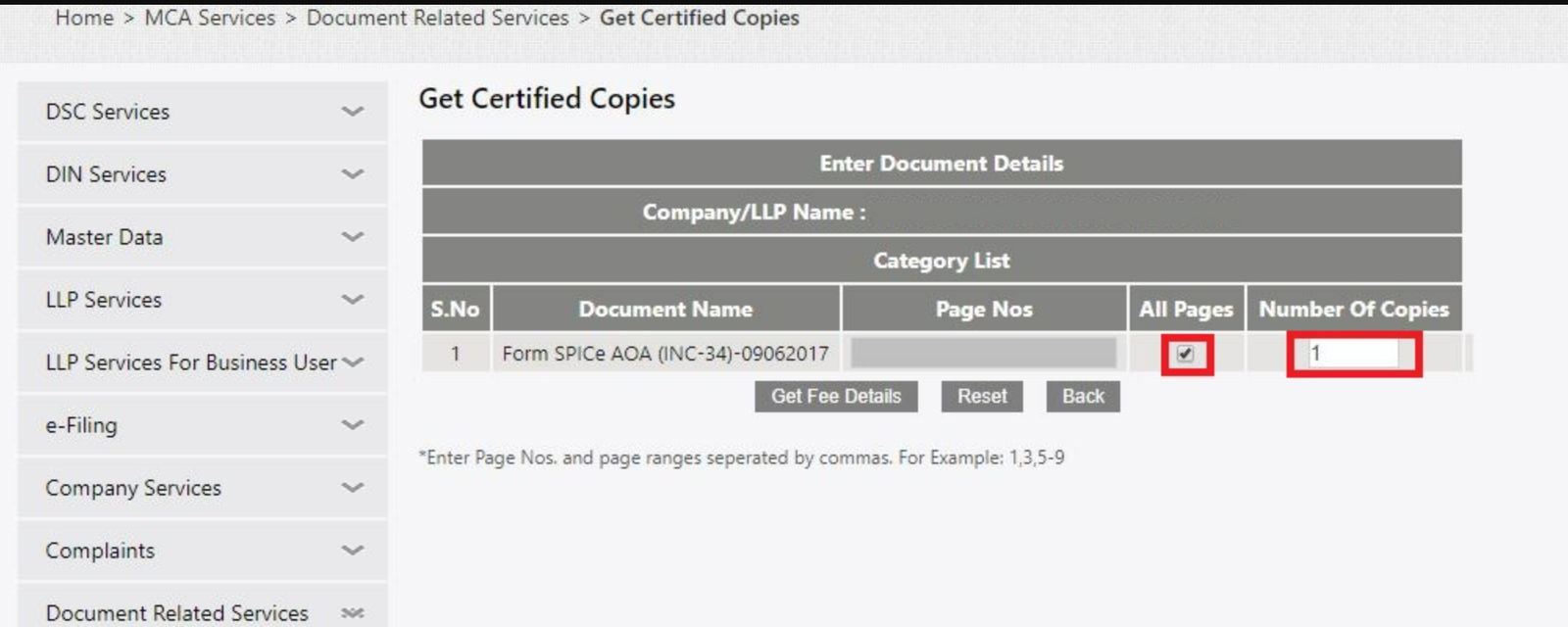
Step 5: Choose Page Range and Copies
You need to enter the page range you want to certify and the number of copies you need. This helps you pick only the pages you need and decide how many copies you want.
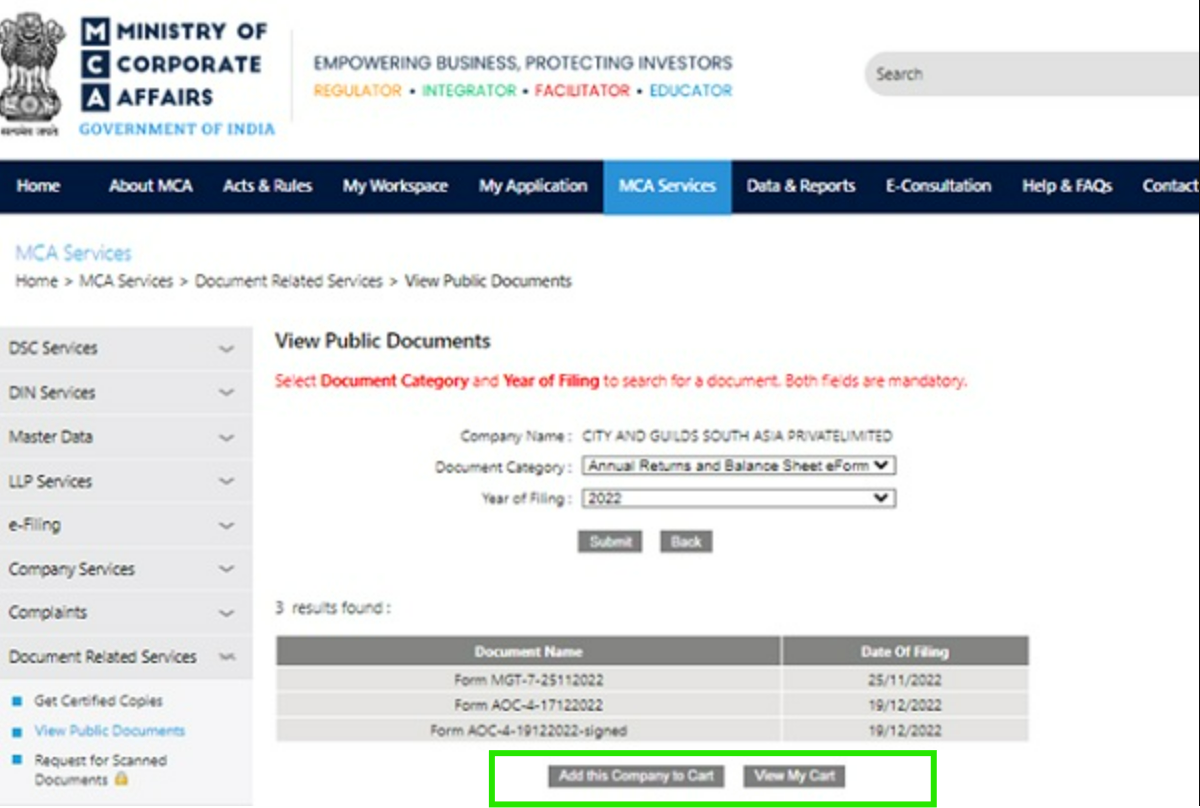
Step 6: Review Charges and Add to Cart
The system will show the total fee, including stamp duty if required. After checking the amount, click “Add to Cart” to continue with the payment.
Step 7: Confirm Payment Details
After selecting the documents, click on “View Payment Details” to check the total amount you need to pay before making the payment.
Step 8: Complete the Payment
You need to pay the required fee using any available option, such as Credit Card, Debit Card, Internet Banking, NEFT, and more.
Step 9: Download Certificate of Incorporation
After you make the payment, you can download a digitally signed PDF of the company registration certificate from the MCA portal. This certificate comes with a digital signature.
Validity of the Certificate of Incorporation
The Certificate of Incorporation stays valid for the whole life of the company. It does not expire unless some details change and need to be updated. This means that once your company is registered, you don’t need to get a new certificate every year. The same certificate continues to work for bank accounts, legal compliance, and official verification whenever required.
Fees for Certificate of Incorporation (COI ) in India
The fees for getting a Certificate of Incorporation (COI) in India can be different depending on the type of company, authorised capital, and extra services. The total cost usually includes government fees, professional fees, stamp duty, and other related charges. In some cases, companies also pay for name reservation, digital signatures (DSC), and PAN/TAN services during the registration process. Because of these factors, the final amount may vary from company to company.
Simple Fee Structure Certificate of Incorporation (COI ) in India
Fee Structure Certificate of Incorporation (COI ) details in India is:
- Government Fees: Charged by MCA based on company type and capital
- Stamp Duty: Charged by individual states on MOA, AOA & SPICe forms
- Professional Fees: Charged by CA/CS/Lawyers for documentation & filing
- DSC Charges: For Digital Signature Certificates for Directors
- PAN & TAN Fees: Charges for issuing PAN and TAN for the company
- Name Reservation Fees: Charged for reserving the company name
Total Cost Range
To give a basic idea:
- Private Limited Company: ₹8,000 to ₹30,000+
- LLP (Limited Liability Partnership): ₹6,000 to ₹20,000+
- OPC (One Person Company): ₹8,000 to ₹20,000+
Actual costs may change depending on the state, the company’s capital, and the professional services you choose.
Changes to the Certificate of Incorporation
If you need to make changes after getting your Certificate of Incorporation—for example, changing your company name—you must follow a proper process:
- Check if the new name is available.
- Hold an Extraordinary General Meeting (EGM) if required.
- Pass a special resolution for approval.
- After completing the internal approvals, apply to the Registrar of Companies (RoC) for final approval.
It is important to note that changing a company’s name requires updating the Certificate of Incorporation. However, changing the registered address does not affect the certificate; in such cases, only the company master data must be updated on the MCA records.
Steps to Take If You Are Unable to Find or Download Your COI
If you are not able to download your Certificate of Incorporation (COI), try these steps:
- Check the CIN: Make sure your company’s CIN is correct. You can confirm it on the MCA website.
- Use your SRN: If you have a Service Request Number, use it to search for your documents.
- Check your MCA login: Log in with the same MCA account that was used during company registration.
- Contact MCA support: If the problem still continues, contact the MCA Helpdesk or submit a complaint through the MCA Grievance section.
Do I have to pay to download the COI?
There is no fee for downloading the Certificate of Incorporation from the MCA portal. Companies can access the digital PDF for free. But if you want certified copies or printed copies for official use, the MCA will charge a fee. The amount varies based on the type of document and the number of pages required.
How to Verify a Certificate of Incorporation (COI)?
To check if the Certificate of Incorporation (COI) is genuine, you can verify the following:
- CIN Number: Check if the CIN number on the certificate matches the details on the MCA website.
- ROC Seal: Make sure the certificate has the RoC seal. Without it, the document may not be valid.
- Digital Signature: Make sure the certificate includes a digital signature from the authority who issued it. This proves the document is authentic.
Conclusion
The Incorporation Certificate is an important document that confirms your company is officially registered in India. By following the steps, you can easily download it from the MCA website.
This certificate helps in opening bank accounts, getting licenses, doing tenders, audits, and using government benefits. It also shows investors and customers that your business is real and legal. If you keep a digital copy, you can access it quickly whenever needed without any delay.
FAQ
- What is a Certificate of Incorporation (COI)?
A Certificate of Incorporation (COI) is an official document issued by the Government that proves your company is legally registered.
- Who issues the Certificate of Incorporation in India?
The MCA (Ministry of Corporate Affairs) issues the certificate through the Registrar of Companies (RoC).
- Is the Certificate of Incorporation mandatory?
Yes, it is mandatory for companies. Without it, a company cannot legally operate or conduct business activities.
- How can I download the Certificate of Incorporation?
You can download it from the MCA (Ministry of Corporate Affairs)website by logging in and using your Company Identification Number (CIN).
- Is there a fee to download the Certificate of Incorporation online?
Downloading the digital copy is normally free. However, certified or printed copies may require extra charges.
- Is the Certificate of Incorporation valid for a lifetime?
Yes, the certificate remains valid as long as the company exists. There is no need to renew it.
- What details are mentioned on the Certificate of Incorporation?
It includes the company name, CIN, registration date, type of company, and RoC seal.
- Can I update the Certificate of Incorporation?
Only in some cases, like a company name change. Address changes do not require updating the certificate.
- Why do banks ask for the Certificate of Incorporation?
Banks use it for KYC to verify that the company is legally registered before opening a current account.
- What if I can’t find or download my Certificate of Incorporation?
You can verify your CIN, check login details, or contact the MCA helpdesk for assistance.