

The Universal Account Number is a unique ID number given to every EPFO member. You only get one UAN for your whole working life, even if you change many jobs.
Each job gives you a new EPF account number, but all those accounts stay linked to the same UAN.
After you activate your UAN, you can quickly see your EPF balance, move your funds when you change jobs, and request withdrawals online without visiting any office.
What is the Universal Account Number in EPFO?
The UAN is a 12-digit, unique number given by the EPFO and checked by the Ministry of Labour. This number stays the same for an employee throughout their career, even if they change multiple jobs. Whenever an employee joins a new job, EPFO creates a new EPF member ID, which is linked to the same UAN.
It makes it easy to transfer PF funds and request withdrawals. When you share your UAN with a new employer, your new PF account automatically gets linked to the same UAN. So all your PF accounts from different jobs stay under one number.
Why is UAN Important for EPF Employees?
If you work in a company that deposits PF for you, you will be given a Universal Account Number (UAN). Earlier, every employer created a separate PF member ID for each job, which made it hard to track your PF money. To solve this problem, the UAN system was introduced on October 16, 2014. With this system, all your PF accounts from different jobs remain linked to a single UAN.
With a single UAN, you can easily check and manage multiple PF accounts in one place.
It saves time, removes confusion, and makes PF transfers and tracking easy because you only need one login instead of many.
Benefits of UAN Number for Employees
The following advantages of having a UAN are:
- It keeps all your PF details in one place, making it easy to view and manage.
- It helps EPFO track your job changes smoothly.
- It reduces early PF withdrawals and helps employees save for the long term.
- It gives access to many online PF services, such as:
- Checking and downloading your PF passbook
- Viewing company details, joining date, and pension (EPS) information
- Downloading your UAN card
- Updating personal details and KYC documents
- Applying for PF or pension withdrawals online
- Linking and merging multiple PF accounts from different jobs
How to Generate UAN Number (Step-by-Step)
When a person starts working in a company, managing PF details becomes necessary for salary records and future benefits. For someone joining a job for the first time, the employer has to create a Universal Account Number if the company has 20 or more employees.
If the employee already had a UAN from a previous job, they just need to share that number with the new employer, and it will be linked to their new PF account.
To generate a new UAN for an employee, the employer needs to:
- Log in to the EPF Employer Portal using their username and password
- Click on “Register Individual” under the “Member” section
- Enter details like PAN, Aadhaar, and bank information
- Approve all the details in the “Approval” section
After approval, EPFO creates the UAN, and the employer links the employee’s PF account to it.
How to Find a UAN Number Online?
You can easily find your UAN (Universal Account Number) online using your PF details. Follow these simple steps:
Step-by-Step Process
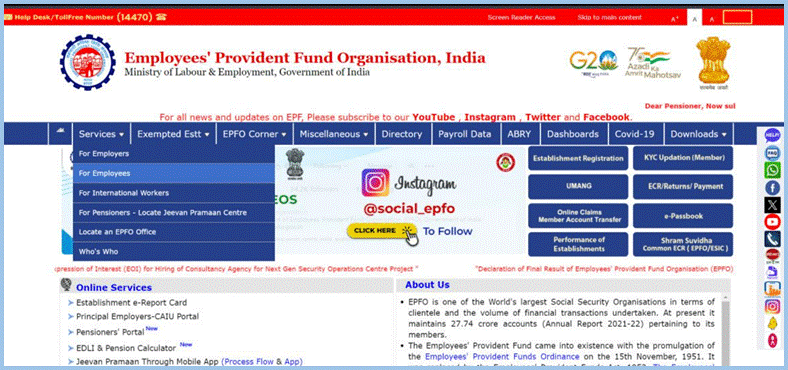
- Go to the EPFO official website
- Click on “Know Your UAN” option
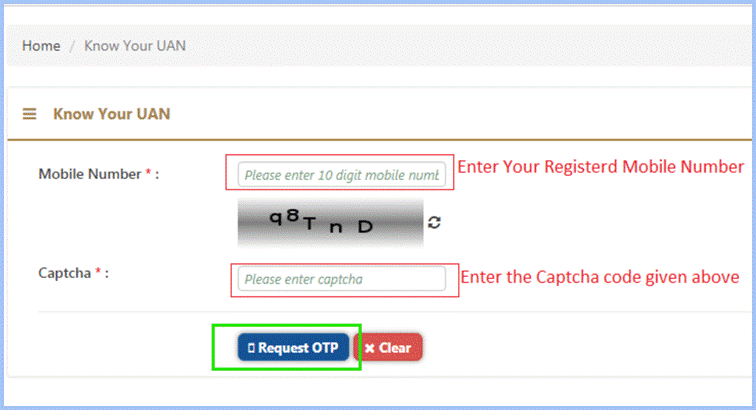
- Enter your mobile number and captcha
- Click on “Request OTP”
- Enter the OTP received on your phone
- Fill in your basic details like your name, date of birth, and Aadhaar or PAN number.
- Click on “Show My UAN”
- Your UAN number will be displayed
Alternative Ways
- Check your salary slip (UAN is often mentioned)
- Ask your employer or HR
- Check EPF passbook
| Method | What You Need | Result |
| EPFO Website | Mobile + details | Get UAN online |
| Salary Slip | Payslip | UAN printed |
| Employer/HR | Basic details | Get UAN quickly |
| EPF Passbook | Login access | UAN visible |
UAN Portal Services
The Universal Account Number portal gives employees different services to handle their PF accounts without any trouble.
1. View Services
- Profile: See your personal details like name, UAN, date of birth, phone number, address, etc.
- Service History: See all your PF accounts from different companies under one UAN.
- UAN Card: Download and print your UAN card.
- EPF Passbook: Check your PF balance and monthly contributions.
2. Manage Services
- Joint Declaration: Update personal details like name, date of birth, and gender (needs employer approval).
- Contact Details: Update mobile number and email (no employer approval needed).
- KYC: Add or update KYC details such as Aadhaar, PAN, bank account, and passport.
- E-Nomination: Add or change your nominee online.
- Mark Exit: Update the date you left the company so you can withdraw PF.
3. Account Services: Update or reset your EPFO password if you forget it.
4. Online Services
- Claims: Apply for PF withdrawal (partial or full) after completing KYC.
- One Member, One EPF Account: Transfer or merge old PF accounts into one after updating KYC.
- Track Status: Check the status of your PF withdrawal or transfer request.
- Download Annexure K: Download Annexure K for PF transfer from exempted to non-exempted organisations.
How to Know Your UAN?
Once the UAN is created and your PF account is linked to it, the employer usually shares the UAN and PF details with the employee. Most companies print the UAN on the salary slip. Just check your salary slip to know your UAN.
If you don’t receive it, you can also find your UAN online by following a few simple steps explained below.
- Go to the EPFO Member Portal to check your UAN.
- Select the “Know Your UAN” tab, and a new page will appear.
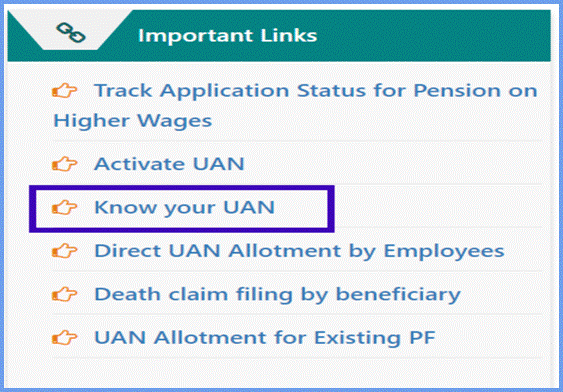
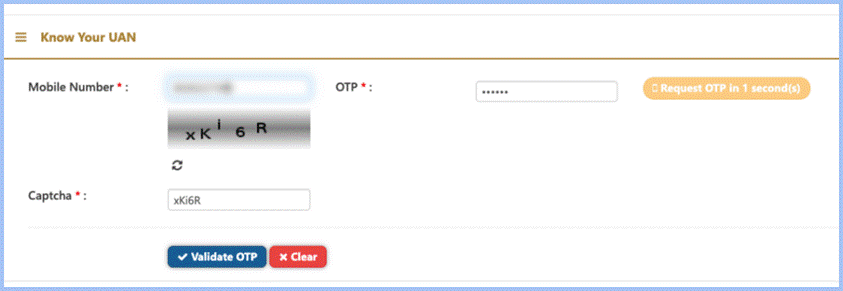
- Type your registered mobile number and the captcha code, then click on “Request OTP”.
- Type the OTP sent to your phone and complete the captcha to verify.
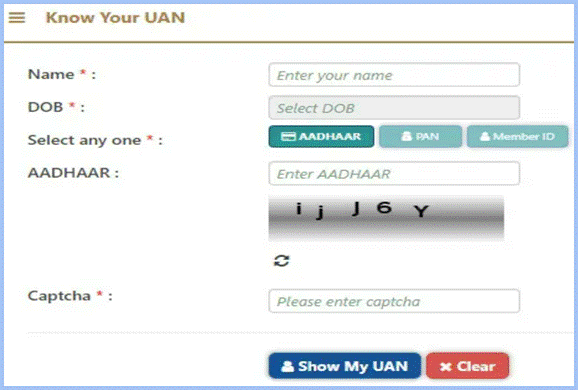
- Next, you will need to enter your name, date of birth, PAN/Aadhaar/member ID, and complete the captcha for verification. Once all details are filled in, click on “Show My UAN”.
Required Documents for UAN Activation
To activate your UAN, a few basic documents are required. Usually, your employer collects these when you start working:
- Aadhaar Card
- PAN Card
- Bank account details with IFSC
- Any other identity or address proof, if asked
How to Activate UAN Online?
To use EPFO services online, you need to activate your Universal Account Number first.
If your UAN is not activated, you cannot access any online PF features. Follow these steps to activate or register your UAN online:
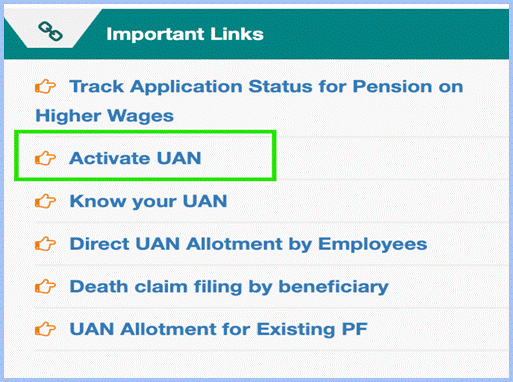
- Open the UAN portal and select Activate UAN under the Important Links section.
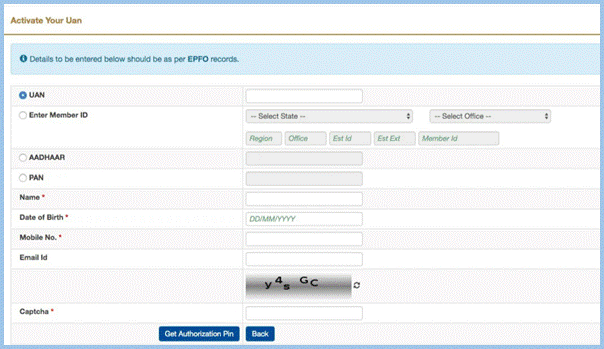
- Choose the UAN option/member ID, and enter other details like Aadhaar, name, DOB, and mobile number, fill the captcha, Check the consent box and click Get Authorisation Pin.
- A new page will open with your details. Check them carefully and make sure everything is correct.
- Now, click on the “I Agree” checkbox. Enter the four-digit OTP and then click on “Validate OTP and Activate UAN”.
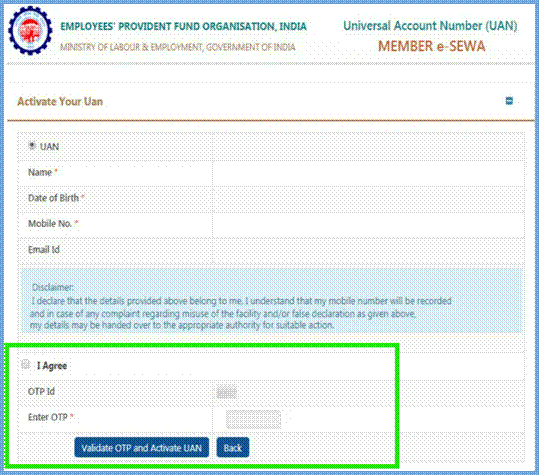
- Once the OTP is verified, your UAN will be activated.
Once your UAN is activated, you’ll get a login password on your registered mobile number to log in to your account.
How to Check PF Balance Using Universal Account Number?
You can easily check your PF balance using your UAN number. It is quick and simple if your UAN is active.
Method 1: EPFO Portal
- Go to the EPFO website
- Click on “Member Passbook”
- Enter your UAN and password
- Login to your account
- Select your PF account
- You can see your PF balance
Method 2: SMS
Send SMS: EPFOHO UAN ENG to 7738299899 . You will get your PF balance on your phone.
Method 3: Missed Call
Give a missed call to 9966044425 from your registered mobile number. You will receive your PF balance details via SMS.
Method 4: UMANG App
- Download the UMANG app
- Login with your mobile number
- Select EPFO services
- Click on “View Passbook”
- Enter UAN and OTP
- Check your balance
| Platform | What You Need | Result |
| EPFO Portal | UAN & Password | Full details |
| SMS | Registered mobile | Quick balance |
| Missed Call | Registered mobile | Instant SMS |
| UMANG App | Mobile & UAN | Easy access |
How to Download a UAN Card & Passbook?
You can easily download your UAN card and EPF passbook online using your UAN login.
Download UAN Card
- Go to the EPFO website
- Login using your UAN and password
- Click on “View” option
- Select “UAN Card”
- Your UAN card will open
- Click on “Download”
Download EPF Passbook
- Go to the EPFO passbook portal
- Login using your UAN and password
- Select your PF account
- Click on “View Passbook”
- Download or print the passbook
| Document | What to Do |
| UAN Card | Login → View → UAN Card → Download |
| EPF Passbook | Login → Select Account → View → Download |
Note: Make sure your UAN is active and KYC is updated before downloading.
PF Withdrawal Using UAN
You can withdraw your PF amount online using your Universal Account Number. Make sure your UAN is active and your KYC (Aadhaar, PAN, bank) is updated.
Step-by-Step Process
- Go to the EPFO website
- Login using your UAN and password
- Click on “Online Services”
- Select “Claim (Form-31, 19, 10C)”
- Enter your bank account number and verify
- Click on “Proceed for Online Claim”
- Select withdrawal type (Full/Partial)
- Fill required details
- Submit the claim using OTP
Types of Withdrawal
- Full Withdrawal (after leaving job)
- Partial Withdrawal (for emergency needs)
- Pension Withdrawal (Form 10C)
Can You Get a Loan Using PF?
You cannot take a direct loan using your PF balance. But you can withdraw money from your PF as an advance when needed.
EPFO allows this for reasons like medical emergency, education, marriage, or buying a house. This works like a loan because you can use your own PF money. You do not have to pay any interest.
PF Loan / Advance Details Table
| Feature | Details |
| Direct Loan | Not allowed |
| PF Advance | Allowed |
| Interest | No interest |
| Uses | Medical, education, marriage, home |
Personal Loan for Salaried Employees Using PF
Salaried employees can easily get a personal loan if they have a PF account. Your PF record shows that you have a regular job and stable income, which helps banks trust you.
Many banks offer a salary based loan to employees who have a steady salary and PF contribution. Because your income is regular, your chances of loan approval are higher.
You may also get a low interest loan compared to others. Banks see salaried employees with PF as low-risk, so they offer better interest rates and easy repayment options.
How to Link Aadhaar with UAN?
Linking Aadhaar with your EPF makes PF withdrawals and transfers smoother and quicker. And if your Universal Account Number and Aadhaar are already verified, you can complete the linking on the UAN portal yourself — no need to ask your employer for approval.
Steps to link your Aadhaar with UAN:
Step 1: Sign in to the EPFO portal using your UAN, password, and captcha.
Step 2: Go to the Manage tab on the top menu and click on KYC.
Step 3: Fill your 12-digit Aadhaar number and your name, and then save the details.
Step 4: Your request will now appear under “KYC Pending for Approval”.
Step 5: After UIDAI confirms your details, the employer’s name will show under Approved by Establishment, and your Aadhaar will show Verified by UIDAI.
How to Link Multiple EPF Accounts Under One UAN?
If you have worked with more than one employer, you may have multiple PF accounts. All these accounts should be linked to a single UAN so that checking the balance and making withdrawals becomes easier. You can link these accounts online through the EPFO portal, and often they link automatically if your Aadhaar and KYC are updated. If the online option does not work, your employer can help. Just make sure your personal details match. After linking, all PF accounts show under one UAN.
Earlier, PF had to be transferred manually using the “One Member – One EPF Account” feature. From 1 April 2024, EPFO auto-transfers PF accounts to the new employer when you switch jobs, without any form or request. All PF accounts link to one UAN.
How to Download a UAN Passbook?
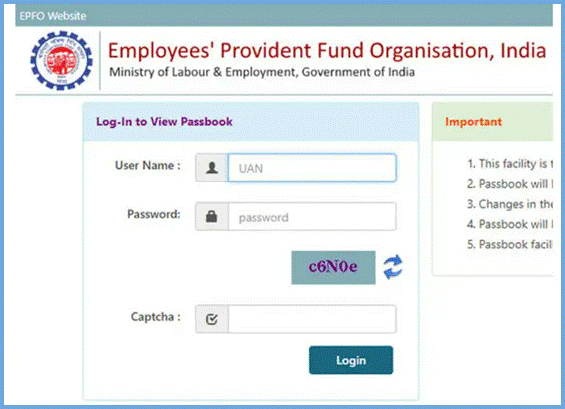
You can easily check and download your EPF passbook online from the EPFO portal. For this, you need to be registered on the platform. After registration, you can get your passbook in two ways:
• EPFO Portal
• UMANG App
How to Reset Your Universal Account Number Password?
If you forget your UAN password, you can easily reset it online by following these steps:
Step 1: Go to the UAN portal.
Step 2: Click on ‘Forgot Password’.
Step 3: Enter your UAN and the captcha shown on the screen, then click ‘Submit’.
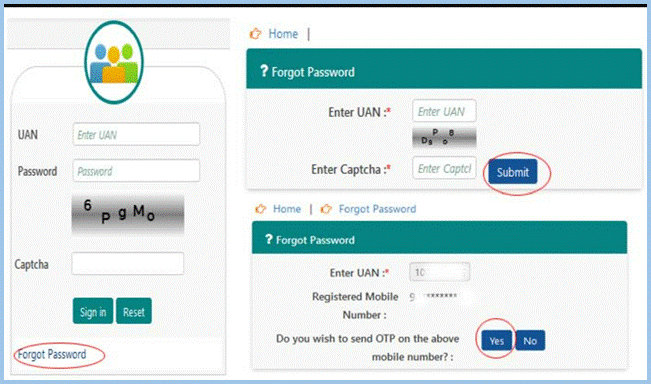
Step 4: Provide your name, gender, and date of birth and click ‘Verify’.
Step 5: Enter your Aadhaar number and the captcha code, then click ‘Verify’ again.
Step 6: After successful verification, enter your mobile number and click ‘Get OTP’.
Step 7: Enter the OTP received on your mobile and click ‘Verify’.
Step 8: You will be able to create a new password. Enter the new password twice in the respective fields and click ‘Submit’ to confirm.
How to Check Your PF Balance With or Without UAN?
There are different ways to check your PF balance, both with UAN and without UAN.
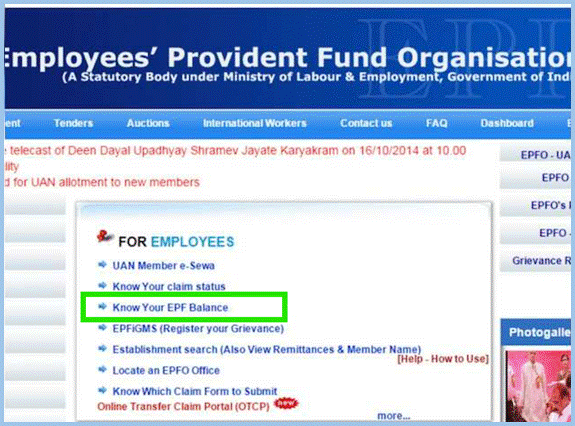
1) If you have a UAN, you can check your PF balance through:
- The EPFO online portal
- The UMANG mobile app
2) If you do not want to use UAN, you can still find out your PF balance by:
- Sending an SMS to 7738299899 in this format: EPFOHO UAN ENG (from your registered mobile number)
- Just give a missed call to 9966044425 from your registered mobile number
How to Change/Update Personal Details in the UAN Portal?
Employees can update their personal information, such as name, dob, mobile number, and email, by logging in to the UAN portal. However, these details must match the information on the Aadhaar card, otherwise the update request will be rejected.
Updating your mobile number or email does not require employer approval. These changes are updated instantly once verified through an OTP. You can also update your bank details on the EPFO portal. But for the bank account to be linked with your Universal Account Number, your employer must digitally approve the request.
PF Withdrawal Rules 2026
PF withdrawal rules have been updated to make the process easier and faster. But you can withdraw PF only under certain conditions.
When Can You Withdraw PF?
You cannot withdraw PF anytime while working. PF is mainly for retirement.
- Full withdrawal is allowed after retirement (age 58)
- Or after leaving job and staying unemployed for some time
Withdrawal After Leaving Job
- After 1 month: You can withdraw up to 75% of your PF
- After 2 months: You can withdraw the remaining amount
Partial Withdrawal (Advance)
You can withdraw some PF amount for specific reasons:
- Medical emergency
- Education
- Marriage
- Buying or building a house
Service Requirement
- Minimum 12 months service is needed for most withdrawals
- Some cases like medical allow faster withdrawal
Tax Rules
- PF withdrawal is tax-free after 5 years
- If withdrawn early, tax (TDS) may apply
New Updates (2026)
- Faster claim processing (sometimes within a few days)
- UPI withdrawal feature coming soon
- Simple categories: essential, housing, special needs
PF Withdrawal Rules Table
| Rule | Details |
| Full Withdrawal | After retirement or unemployment |
| 75% Withdrawal | After 1 month of unemployment |
| 100% Withdrawal | After 2 months of unemployment |
| Partial Withdrawal | Allowed for specific reasons |
| Tax Rule | Tax-free after 5 years |
| Processing Time | Faster (few days in many cases) |
EPF Interest Rate & Benefits
EPF (Employees’ Provident Fund) gives interest on your savings every year. It is a safe way to save money for your future.
The EPF interest rate is decided by the government every year. It is usually around 8% to 8.5% per year (may change yearly).
Benefits of EPF
- Safe Investment – Backed by the government, so your money is secure
- Good Interest Rate – Higher than many savings accounts
- Tax Benefits – No tax on interest after certain conditions
- Retirement Savings – Helps you save money for the future
- Employer Contribution – Your employer also adds money to your PF
EPF Interest & Benefits
| Feature | Details |
| Interest Rate | Around 8% – 8.5% yearly |
| Safety | Government-backed |
| Tax Benefit | Tax-free (conditions apply) |
| Employer Contribution | Yes |
| Purpose | Long-term savings |
Common Issues and Solutions in UAN Registration
These are common issues during UAN activation, and how you can solve them.
- Wrong Registered Mobile Number: Sometimes the mobile number saved with EPFO is different from the one you are using. Make sure both numbers match when activating UAN.
- Wrong Aadhaar / PAN / Member ID: Enter the correct Aadhaar, PAN, or Member ID. If the details are incorrect, the registration will not work.
- Mismatch or Wrong in Personal Details: Your name, date of birth, and other details should match what is in the EPFO records and what is on your Aadhaar/PAN. Even small differences can cause errors.
Conclusion
UAN makes PF work simple. Earlier people had many PF numbers, now only one UAN is used for all jobs. With UAN, you can check PF money, transfer PF when you change job, and withdraw PF online. You don’t need to visit the office again and again. Once your UAN is activated and Aadhaar is linked, the process becomes fast and smooth. Overall, UAN gives more convenience, control, and transparency to employees.
Frequently Asked Questions (FAQs)
1. How can I find my UAN number online?
You can find your UAN number online by visiting the EPFO official website and clicking on the “Know Your UAN” option. Enter your registered mobile number and verify it using OTP. After that, fill in your basic details like name, date of birth, and Aadhaar or PAN number. Once verified, your UAN number will be shown on the screen.
2. How can I activate my UAN for the first time?
To activate your UAN, go to the EPFO portal and click on “Activate UAN.” Enter your UAN, Aadhaar number, mobile number, and other required details. Verify your information using OTP and set a password. Once done, your UAN will be activated and ready to use for all EPFO services.
3. How can I check my PF balance using UAN?
You can check your PF balance using your UAN by logging in to the EPFO portal and opening the passbook section. You can also check your balance using SMS, missed call service, or the UMANG app. These options make it easy to track your PF balance anytime.
4. Can I download my UAN card and EPF passbook online?
Yes, you can download both your UAN card and EPF passbook online. Log in to the EPFO portal using your UAN and password, go to the “View” section, and select UAN Card or Passbook. You can then download them in PDF format for your records.
5. How can I reset my UAN password if I forget it?
If you forget your UAN password, click on the “Forgot Password” option on the EPFO portal. Enter your UAN and verify your details using OTP. After verification, you can create a new password and log in again easily.
6. Can I withdraw PF money online using UAN?
Yes, you can withdraw your PF money online using your UAN. After logging in to the EPFO portal, go to the “Online Services” section and select the claim option. Fill in the required details, verify your bank account, and submit the request. The process is simple and usually takes a few days.
7. How long does PF withdrawal take after applying online?
PF withdrawal usually takes around 3 to 7 working days if all your details are correct and your KYC is completed. In some cases, it may take a little longer depending on verification or technical issues. Keeping your details updated helps speed up the process.
8. Is Aadhaar mandatory for UAN services?
Yes, Aadhaar is required for most UAN services. You need to link your Aadhaar with your UAN to use features like PF withdrawal, transfer, and online claims. It also helps in faster verification and secure access to your account.
9. Can I have multiple UAN numbers?
No, an employee should have only one UAN number. Even if you change jobs multiple times, the same UAN is used for all PF accounts. If you have more than one UAN, they should be merged into a single account.
10. Can I take a loan using my PF balance?
You cannot take a direct loan using your PF balance, but you can withdraw some amount as an advance. EPFO allows partial withdrawal for needs like medical treatment, education, marriage, or buying a house. This helps you manage financial needs without paying any interest.









