
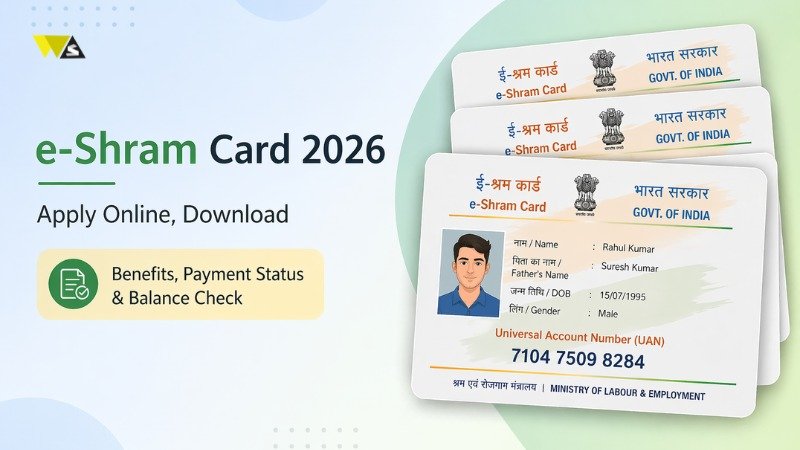
The e-Shram card is a useful card for workers in the unorganised sector. It helps them get benefits from government schemes and services. With this card, workers can receive financial help, insurance, and pension support.
Read further to know about e-Shram card 2026 & eligibility, how to apply, and how to download it.
What is an e-Shram Card 2016?
The Government of India started the e-Shram Yojana to support workers in the unorganised sector. The main aim is to keep workers’ details so they can get government benefits.
Any worker in the unorganised sector can apply for an e-Shram card (also called Shramik card). In Budget 2025, the government also talked about registering gig and platform workers on the e-Shram portal.
With an e-Shram card, workers can get benefits like pension after 60 years, insurance, financial help in case of disability, and a unique UAN number.
What is the Unorganised Sector?
The unorganised sector includes small businesses or jobs where fewer than 10 people work. These are not covered under EPFO or ESIC.
People working in such jobs can apply for an e-Shram card.
Benefits of e-Shram Card 2026
- ₹3,000 pension every month after 60 years
- ₹2 lakh insurance in case of death
- ₹1 lakh help if the worker becomes partially disabled
- If the worker dies, the spouse gets the benefits
- A 12-digit UAN number valid across India
| Benefit | Details |
| Pension | ₹3000/month after 60 |
| Insurance | ₹2 lakh cover |
| Disability Help | ₹1 lakh |
| UAN Number | Unique ID |
Eligibility Criteria for e-Shram Card 2026
The e-Shram Card 2026 is for workers in the unorganised sector. If you meet certain conditions, you can apply easily. Eligibility Criteria are following:
- Any worker working in the unorganised sector
- Age should be between 16 to 59 years
- Must have a mobile number linked with Aadhaar
- Should not be an income tax payer
| Criteria | Requirement |
| Worker Type | Unorganised sector |
| Age Limit | 16–59 years |
| Mobile Number | Linked with Aadhaar |
| Income Tax | Should not be taxpayer |
e-Shram Card Registration – How to Apply for an e-Shram Card Online?
You can apply for the e-Shram card 2026 through a CSC centre (Common Service Centre) or the e-Shram portal. You can visit the nearest CSC to apply, or use the portal to find a CSC by entering your state and district.
The steps to apply for the e-Shram card online are given below:
Step 1: Open the e-Shram website portal in your browser.
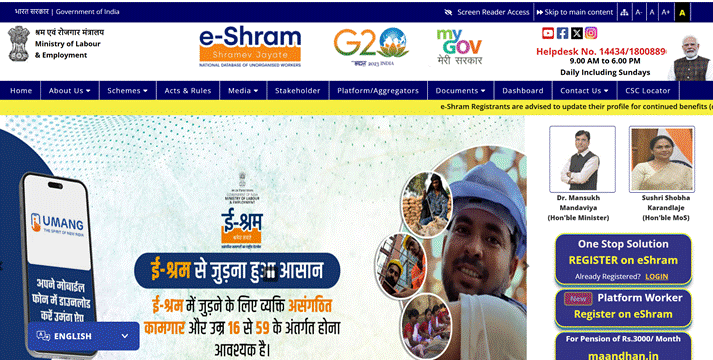
Step 2: On the homepage of the e-Shram Portal, click on “Register on eShram” under the “One Stop Solution” section.
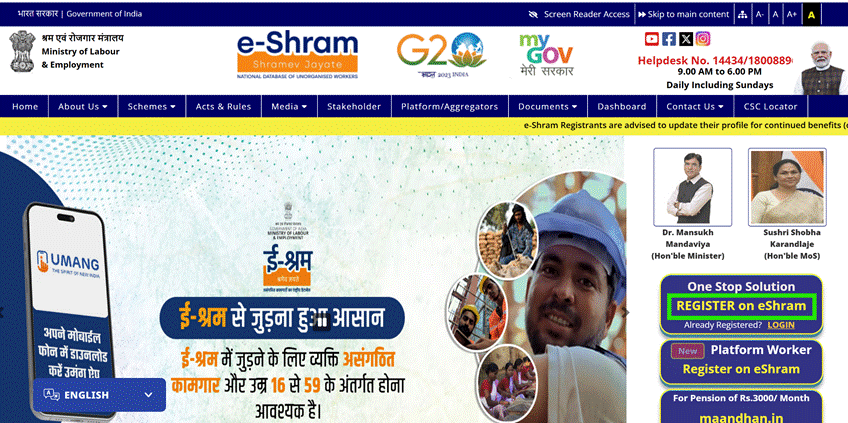
Step 3: Enter your Aadhaar-linked mobile number and fill in the captcha code. Then select whether you are a member of Employees’ Provident Fund Organisation (EPFO) or Employees’ State Insurance Corporation (ESIC), and click on “Send OTP”.
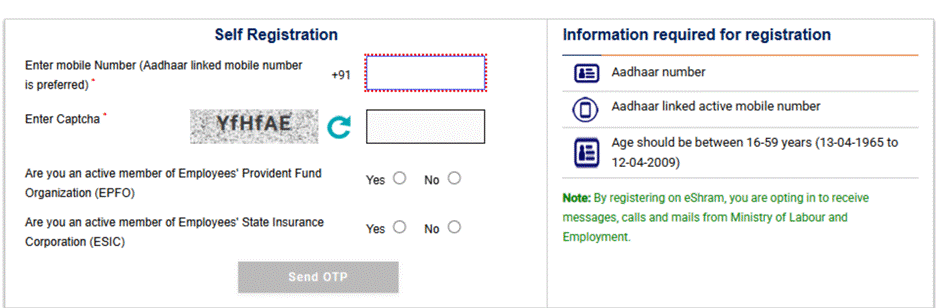
Step 4: You will receive an OTP on your registered mobile number. Enter the OTP and captcha code, then click on “Submit”.
Step 5: Choose “Register using Aadhaar”, enter your Aadhaar number, verify via OTP, complete the captcha, agree to the terms, and click “Submit”.
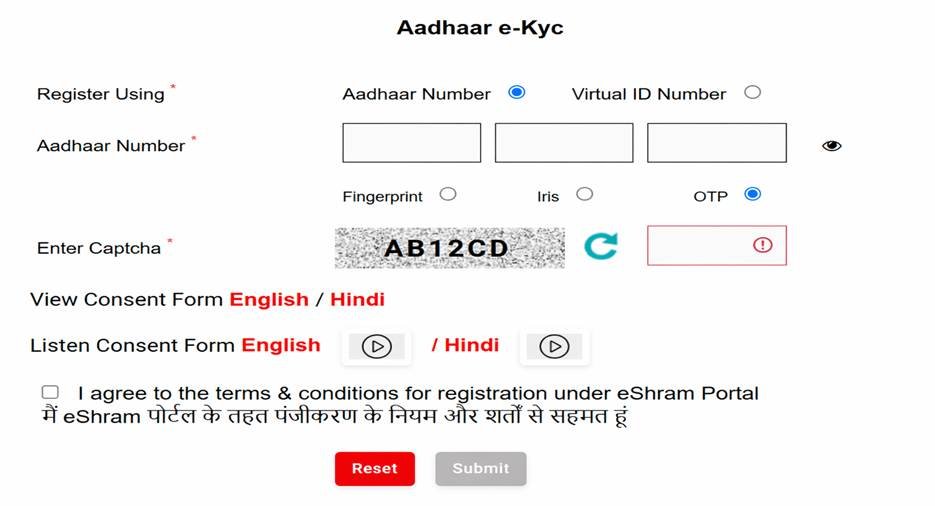
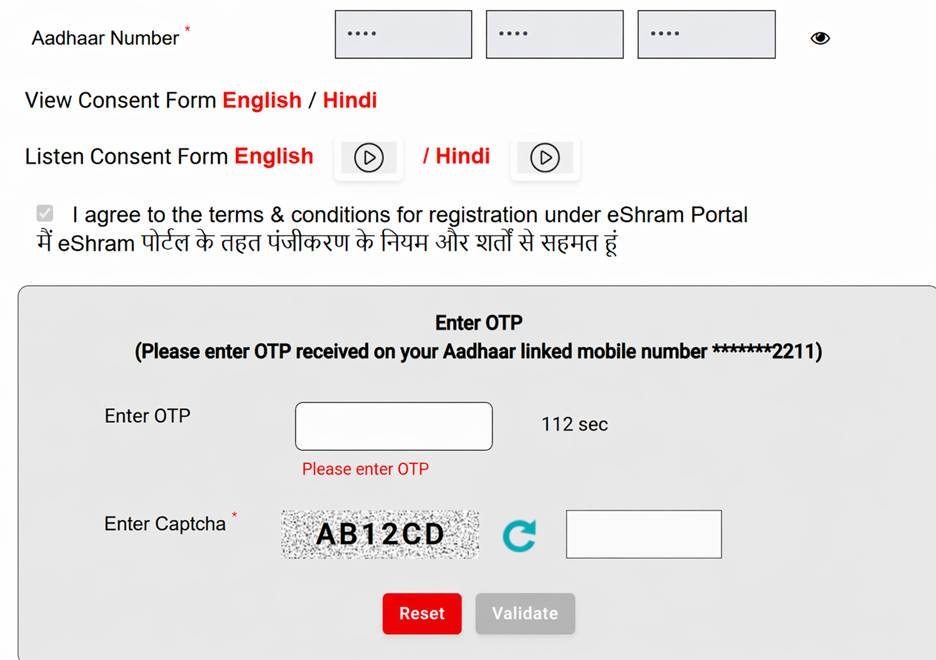
Step 6: Type the OTP, enter the captcha code, and press “Validate”.
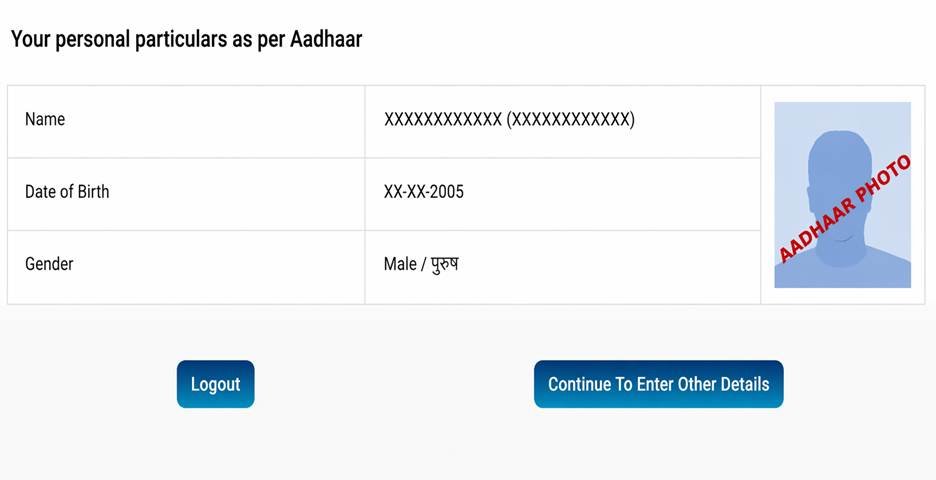
Step 7: Make sure your personal information is correct and click on “Continue to Enter Other Details” to continue.
Step 8: Complete the form by entering your personal details, address, education, work details, skills, and bank information.
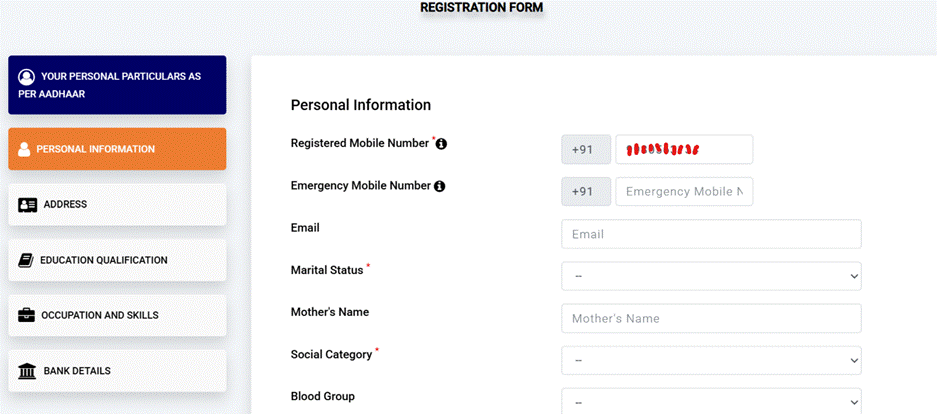
Step 9: Choose the self-declaration option and press “Submit” to complete the process.
Step 10: Your card will be ready on the screen. Simply click “Download” to get it on your device.
Documents Required for e-Shram Card
- Aadhaar card is required for identity verification and registration
- Mobile number linked with Aadhaar is needed to receive OTP for verification
- Bank account details are required to receive benefits and payments
Ways to Download e-Shram Card
1) e-Shram Card Download PDF Procedure
- Go to the e-Shram portal and click on the “Already Registered” option to start the download process
- Enter your Aadhaar-linked mobile number, captcha, and click on “Send OTP”
- Enter the OTP received on your mobile number and click on “Verify” to log in
- After login, your details will appear on the screen
- Click on the “Download UAN Card” or download option
- Your e-Shram card PDF will be downloaded, and you can save or print it
2) e-Shram Card Download by Aadhaar Number
- Go to the e-Shram portal and click on the “Login” option under the One Stop Solution section
- Enter your Aadhaar-linked mobile number and captcha, then click on “Send OTP”
- Enter the OTP received on your mobile, fill captcha, and click on “Submit” to log in
- Enter your Aadhaar number, select OTP option, fill captcha, and click “Submit”
- Enter the OTP again and click on “Validate” to complete verification
- After login, click on the “Download UAN Card” option
- Your e-Shram card will be shown on the screen
- Click on “Download” to save your e-Shram card PDF
3) e-Shram Card Download by Mobile Number
- Go to the e-Shram portal and click on the “Login” option under the One Stop Solution section
- Enter your Aadhaar-linked mobile number and captcha, then click on “Send OTP”
- Enter the OTP received on your mobile, fill captcha, and click on “Submit” to log in
- Enter your Aadhaar number, choose OTP option, fill captcha, and click “Submit”
- Enter the OTP again and click on “Validate” to complete verification
- After login, click on the “Download UAN Card” option
- Your e-Shram card will appear on the screen
- Click on “Download” to save your e-Shram card PDF
4) e-Shram Card Download by UAN Number
- Go to the e-Shram portal and click on the “One Stop Solution” tab
- Select the “Login Using UAN” option to continue
- Enter your UAN number, date of birth, and captcha, then click on “Generate OTP”
- Enter the OTP received on your mobile, fill captcha, and click on “Validate”
- After login, click on the “Download UAN Card” option
- Your e-Shram card will be shown on the screen
- Click on “Download” to save your e-Shram card PDF
When Will e-Shram Payment Come?
The payment is usually sent through Direct Benefit Transfer (DBT) to your bank account. The timing depends on government schemes and eligibility. Not all registered users receive regular payments, so it is important to check official updates.
Can You Get Loan Using e-Shram Card?
Workers with an e-Shram card may get access to financial support under government schemes. While the card itself does not guarantee a loan, banks may consider your income, work profile, and eligibility. It can help in documentation and improve your chances of getting small loans.
How to Check e-Shram Card Payment Status and Balance
- Go to the e-Shram portal and open the official website
- Click on the “E-Aadhaar Card Beneficiary Status Check” option
- Enter your e-Shram card number, UAN number, or Aadhaar number
- Click on the “Submit” button to continue
- Your payment status and balance details will be shown on the screen
How to Get ₹9,000 Financial Assistance
The government gives financial help in parts, and the money is sent directly to your bank account through DBT.
To get this benefit, you need to first register for an e-Shram card. You can apply online on the official website or visit your nearest CSC using your Aadhaar-linked mobile number.
Application Process for ₹9,000 Financial Assistance
- Go to the e-Shram portal and click on “Register on e-Shram”
- Enter your Aadhaar-linked mobile number and captcha, then continue
- Enter the OTP received on your mobile to verify
- Fill your details like name, address, work type, and bank account
- Submit the form to get your 12-digit UAN number
- Download your e-Shram card and keep it safe for future use
e-Shram Card Benefits in Bank & Insurance
The e-Shram card can help workers access financial services like bank accounts, insurance schemes, and government support programs. It work as identity proof and helps in faster verification.
e-Shram Card Helpline Details
- Helpline Number: 14434 / 1800-889-6811 (Monday to Sunday, 9:00 AM to 6:00 PM)
- Email ID: eshramcare-mole@gov.in
The e-Shram card helps workers in the unorganised sector get government benefits like pension, insurance, and financial support. It provides safety and support for workers and their families.
Conclusion
The e-Shram card is very helpful for workers in the unorganised sector. It helps them get benefits like pension, insurance, and financial support from the government. The registration and download process is simple and can be done online or through a CSC centre.
If you are eligible, you should apply for the e-Shram card to secure your future and get government benefits easily. Always keep your details updated and check your status regularly.
Frequently Asked Questions (FAQs)
1. Who can apply for an e-Shram card?
Any worker in the unorganised sector between 16 to 59 years of age can apply, if they are not an income tax payer.
2. Is there any fee to apply for an e-Shram card?
No, applying on the official portal is free. CSC centres may charge a small service fee.
3. What is UAN in e-Shram card?
UAN is a 12-digit unique number given to every e-Shram card holder.
4. Can I update my details after registration?
Yes, you can update your details by logging into the e-Shram portal.
5. How can I download my e-Shram card?
You can download it from the e-Shram portal using mobile number, Aadhaar, or UAN.
6. What benefits do I get from e-Shram card?
You get pension, insurance, financial help, and access to government schemes.
7. Is e-Shram card valid across India?
Yes, it is valid across India.
8. How can I check my payment status?
You can check it on the e Shram portal using Aadhaar, UAN, or card number.
9. Can I apply without Aadhaar?
No, Aadhaar and a linked mobile number are required for registration.
10. What should I do if I face any issue? You can call the helpline number 14434 or email support for help.