
Most states in India have made land records available online so that people can easily check their land information. In the same way, the Madhya Pradesh government has started the MP Bhulekh portal. This portal helps people check land details without visiting the Tehsil or government office.
If you live in Madhya Pradesh and want to know details like your land’s Gata number, Khasra, Khatauni, certified Bhu Naksha, or land revenue payment, you can use this portal. In this article, we have explained the complete step-by-step process to view and download all this information.
What is MP Bhulekh Portal 2026?
MP Bhulekh is the official land record portal of Madhya Pradesh. Through this portal, all land-related documents are available online. Any citizen of Madhya Pradesh can check their land map, view land records, and get details about Khasra, Khatauni, mortgaged land, and soil use report. Landowners in MP can check their land records online from their homes using the MP Bhulekh portal.
The portal also allows people to view and download Jamabandi Nakal and Bhulekh Khata Nakal. Earlier, people had to visit the Tehsil office for any land document. Even for small information, they had to go to the office. But after land records became digital, this problem has reduced. Now, people can check their land records easily from home using their mobile phone. Making land documents online also helps reduce land disputes. It helps stop people from making false claims on other people’s land.
Benefits of MP Bhulekh Portal
- The portal gives land-related information online to the people of Madhya Pradesh.
- Citizens do not need to visit government offices to check land records.
- Both free and paid services are available on the MP Bhulekh portal.
- Users can download documents like Khasra, Correction Report, Landowner Correction Report, and Halka Bandhi from the portal.
Services Available on MP Bhulekh Portal
The MP Bhulekh portal provides many free land services for the people of Madhya Pradesh. Users can check land records like Khasra, Khatauni, and Bhu-Naksha (land maps) online. They can also see details about land ownership, land diversion, and settlement cases.
The portal also offers services like Aadhar e-KYC, online land tax payment, and tracking of property registration status. People can apply for land mutation and check the status of court cases related to their land. MP Bhulekh is made to give clear and easy access to land information. People can use it anytime from their home without visiting government offices.
MP Bhulekh Portal Free Services Available?
You do not need to register or log in to use the free services on the MP Bhulekh portal. Any citizen of Madhya Pradesh can use these services without creating an account.
The free services include:
- Land Parcel Map
- Normal Land Record (Bhu Abhilekh)
- Population Rights Record
- Record Room Copy (Abhilekhagar Nakal)
- Adhikar Abhilekh Nagari
- Payment and Transaction Details
- Mortgage Land Details
- Agricultural Land Revenue Payment
- RCMS Order
- Diversion Notice
- Civil Court Case Details
- Bail Details
- Other Services
MP Bhulekh Portal Available Paid Services?
To use the paid services on the MP Bhulekh portal, citizens must first register and log in to their account. These services are available after paying a fee.
The paid services include:
- Land Revenue Payment
- Land Rights Booklet
- Search and Download Certified Bhu Abhilekh Copy
- No Objection Certificate (NOC)
- Revenue Court Order Copy
- Copy of Rights Record
- Record Room Abhilekh Copy
- Diversion Notice
- Wallet Recharge
These are official and certified versions of the free services. A fee must be paid to get these documents.
What is Khasra?
Khasra is an official land record given by the Revenue Department in Madhya Pradesh. It is issued by the Tahsildar. This document gives full details about a piece of land and the crops grown on it.
Each land in a village is given a special Khasra number with the help of the village map. This number helps to identify the land easily.
The Khasra record includes:
- Name of the land owner
- Survey number of the land
- Total area of the land
- Land tax (revenue) details
- Address information
- Source of irrigation (like well or canal)
- Details of crops grown
- Type of soil
What is Khatoni?
Khatoni is an official land record document. It is used to keep details of farmers or landowners who have land in different Khasra numbers.
A Khatoni number is given to a group of farmers who grow crops on different pieces of land. It shows complete details about the land they use and the land they own. It is a legal document that keeps the record of all Khasra numbers owned by a person or a family.
The Khatoni record includes:
- Name of the village
- Name of the district
- Khata number
- Khasra numbers
- Total land area
- Name of the owner and father’s name
- Details of ownership changes year by year
How to Check Online Land Records in MP?
Follow these simple steps to check your land records online:
- Go to the official MP Bhulekh website – mpbhulekh.gov.in.
- Click on the “Free Services” option.
- Choose “Khasra / B1 / Map” from the list.
- Enter the required details:
- District (Zilla)
- Tehsil
- Village
Select one of the options:
- Khata number
- Khasra number
Click on “Submit”.
After entering the correct information, your land record details will appear on the screen. You can choose one or more options to view the records.
MP Bhulekh Login
People can check land records on the MP Bhulekh portal without logging in. They only need to enter the land details to view the information.
However, if landowners want to download or get a copy of their land records, they must first register as a public user on the portal. After registration, they need to log in to their account.
How to Register on MP Bhulekh Portal?
- Go to the MP Bhulekh website.
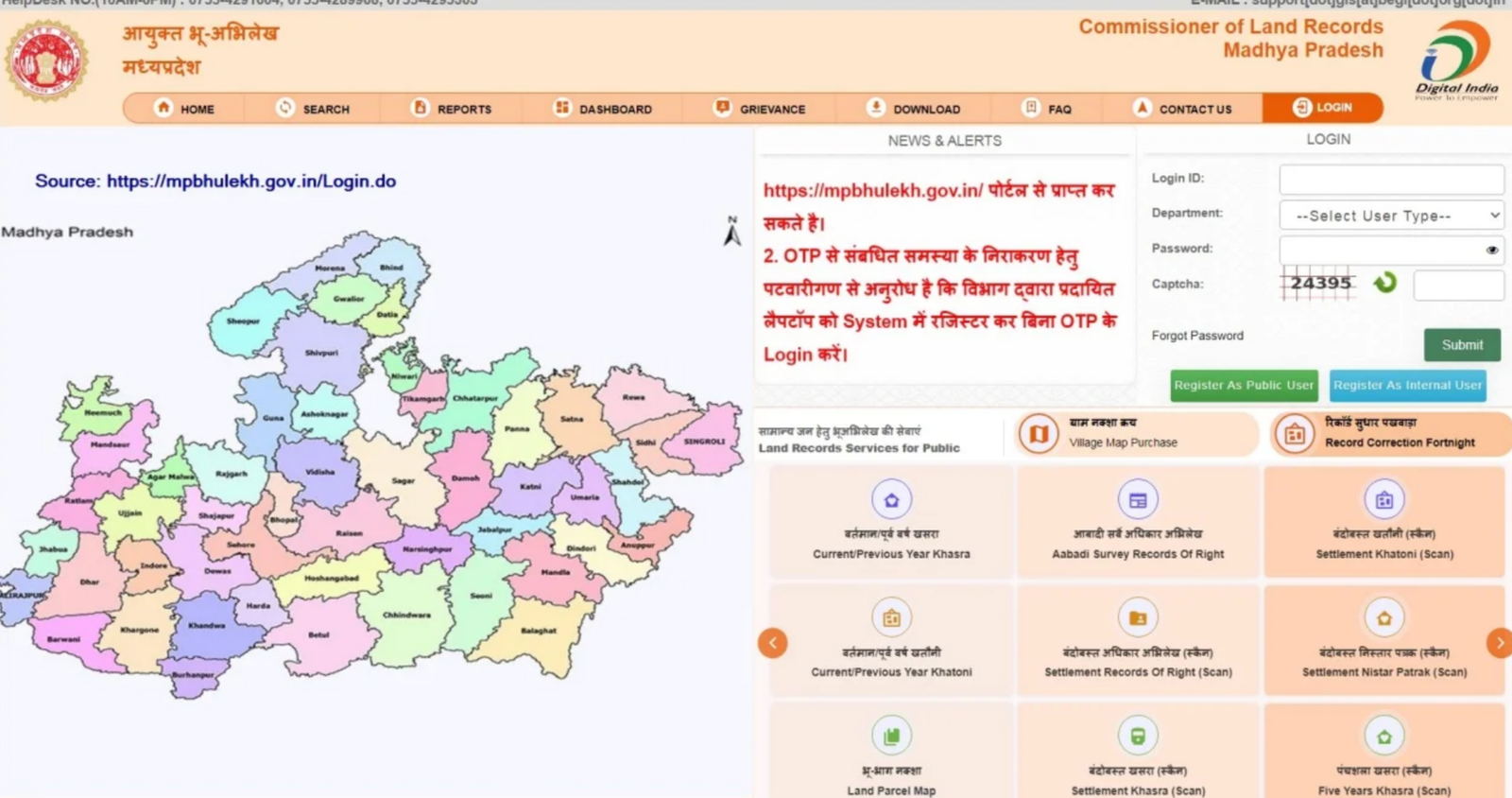
- Choose “Register as Public User” to proceed.
- Enter your general details and contact information.
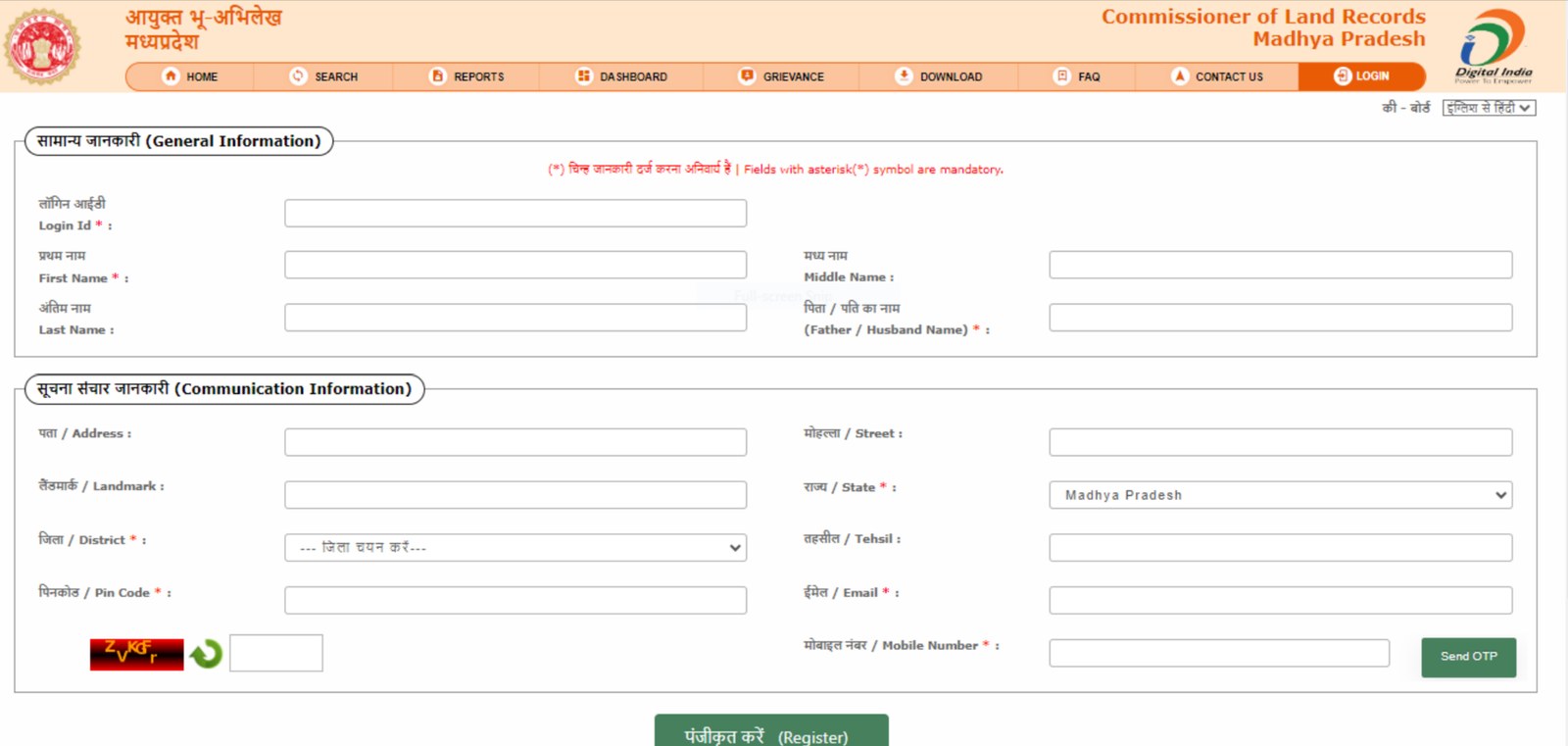
- Click on “Send OTP”.
- Fill in the OTP sent to your registered mobile number.
- Click on the “Register” button.
After this, your registration as a public user will be completed.
When your registration is done, you can simply log in to your MP Bhulekh account. Go to the homepage and enter your Login ID. Then select the department as “Public User.” After that, enter your password and type the captcha code shown on the screen. Finally, click on the “Submit” button. Once you do this, you will be successfully logged into your account.
How to Login to MP Bhulekh Portal?
- Open the MP Bhulekh portal and select the Login option.
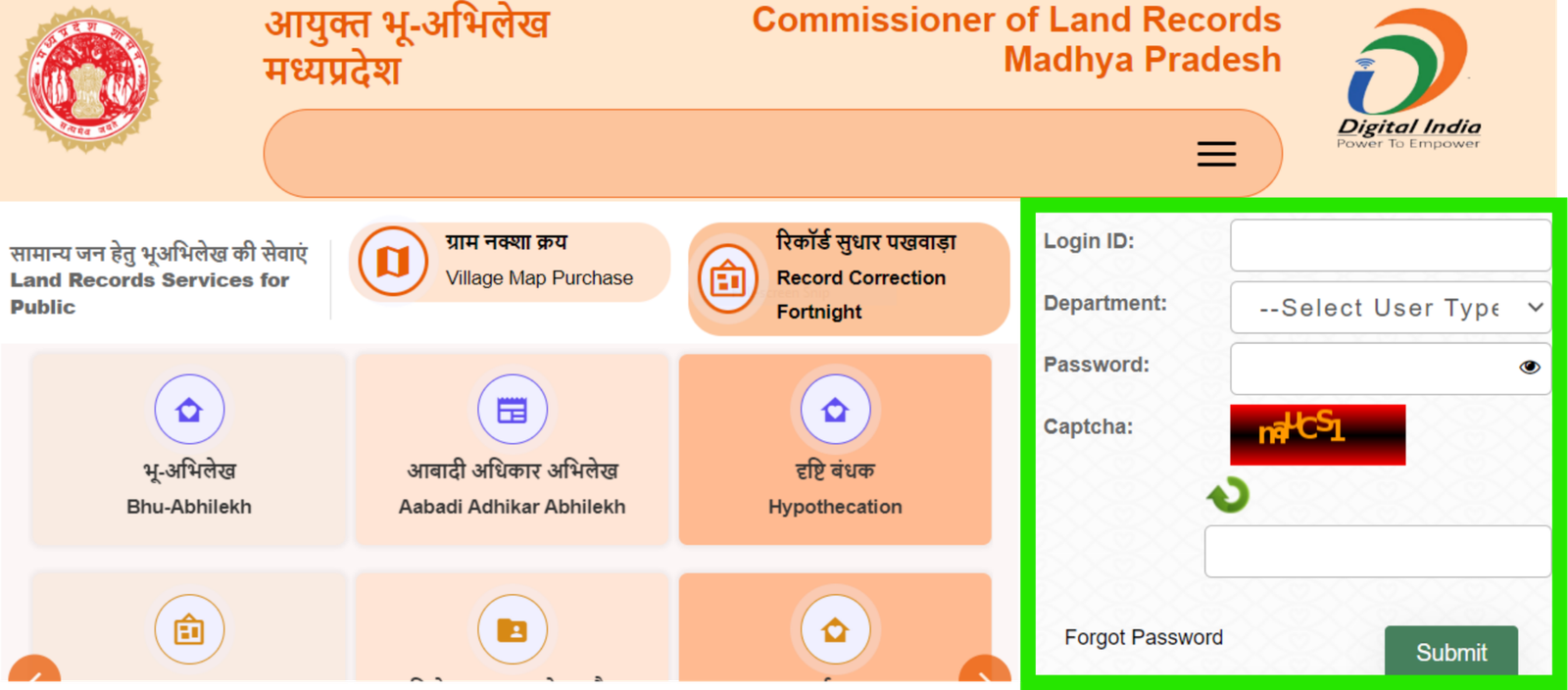
- In the login section, fill in your Login ID, select the department, and enter your password.
- After you register, you will get your Login ID and password.
- If you are a normal user, select Public User in the department list. Other options are only for government staff.
- Fill in the captcha code, then click Submit.
- After following these steps, you will be successfully logged in. Then you can use all the free and paid services on the portal.
How to View or Download Khasra on the MP Bhulekh Portal?
- First, sign in to the MP Bhulekh portal.
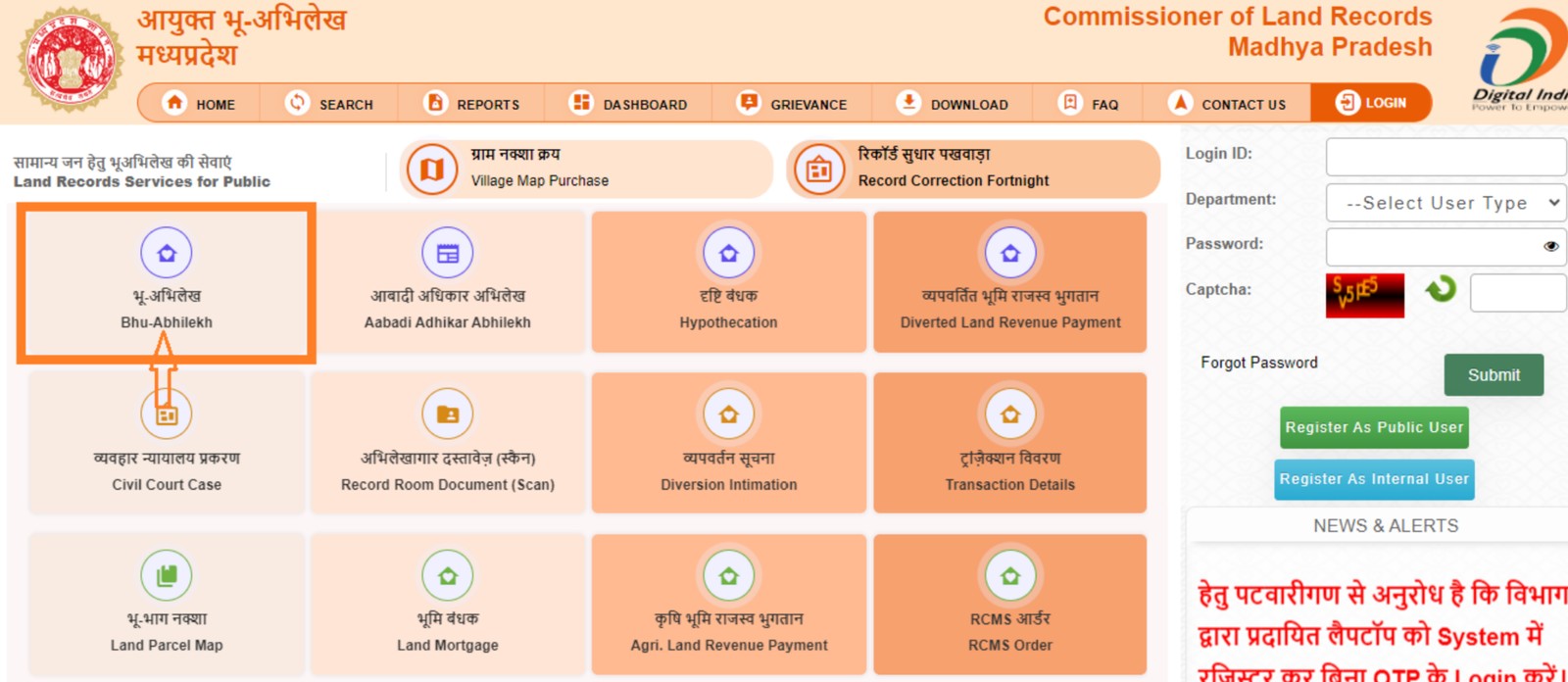
- Then go down on the homepage and select “Current/Previous Years Khasra.”
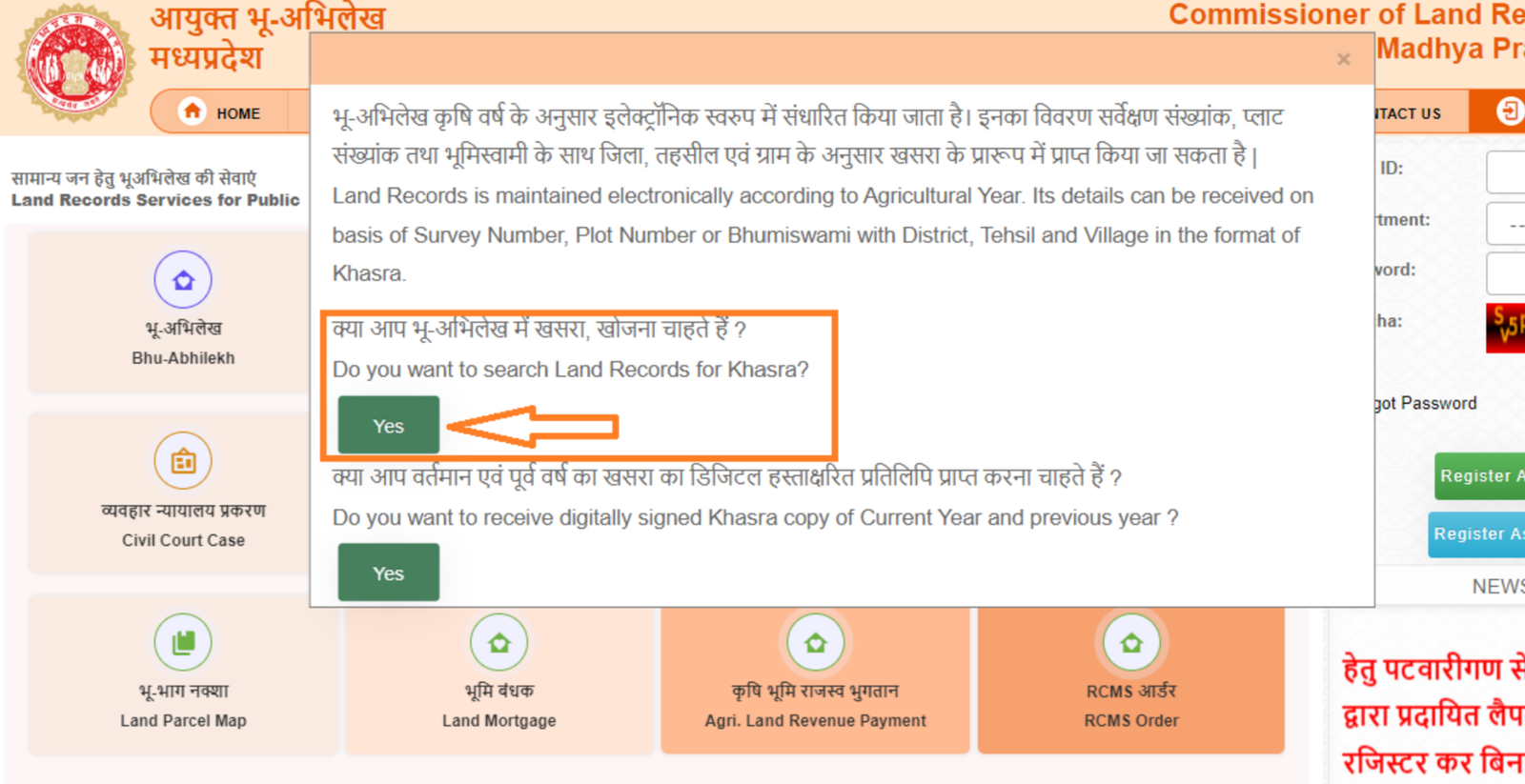
- When the message appears on the screen, click “Yes” if you want to search and view the Khasra land record. If you want to get a digitally signed copy of the Khasra for the current or previous year, click “Yes” for that option as well.
- Enter the land details and choose the district, town, and village. Then select one option — Survey Number, Plot Number, or Owner name and
fill in the required information. After that, click on the “View” button to see the Khasra or click on the “Get” button to download it.
How to View or Download Khatoni on the MP Bhulekh Portal?
- Log in to the MP Bhulekh website.
- Then scroll down the homepage and select “Current/Previous Years Khatoni.”
- When the message appears, click “Yes” if you want to search and view the Khatoni land record. If you want to get a digitally signed copy of the Khatoni for the current or previous year, click “Yes” for that option too.
- Enter the land details and choose the district, town, and village. Then select one option — Survey Number, Plot Number, or Owner name — and
enter the required information. After that, click on the “View” button to see the Khatoni or click on the “Get” button to download it.
How to View or Download Land Map on the MP Bhulekh Portal?
- Log in to the MP Bhulekh website.
- Then scroll down the homepage and select “Land Parcel Map.”
- When the message appears, click “Yes” if you want to view the village-wise land map. If you want to get a certified copy of the parcel map, click “Yes” for that option as well.
- Select your district, town, and village from the list.
- The map will appear on the screen. It will clearly show government land, private land, unlink land, and other types of land marked on the map.
How to View or Download Record of Rights (RoR) on the MP Bhulekh Portal?
- Log in to the MP Bhulekh website.
- Then scroll down the homepage and select “Aabadi Survey Record of Rights.”
- When the message appears on the screen, click “Yes” if you want to search and view the Adhikar Abhilekh (RoR). If you want to get a certified copy of the RoR, click “Yes” for that option as well.
- Choose the district, town, and village. Then select one option — Survey Number, Plot Number, or Owner name — and enter the required detail. After that, click on the “View” button to see the record or click on the “Get” button to download it.
How to Add a Mortgage Property on MP Land Record?
If you want to add mortgage details to your property on the MP Bhulekh portal, you need to update the land record with the correct information. Follow these simple steps:
- First, visit the official MP Bhulekh website and log in to your account. If you are not registered, create an account first.
- Next, find and select the property for which you want to add mortgage details.
- Then, choose the option to add mortgage information and enter the required details carefully.
- After that, upload the necessary mortgage documents. Check all the details properly and submit the request. Make sure to save or note the acknowledgment number for future reference.
You can later check the status of your request on the portal. If you face any problem, you can contact the local land record office for help.
How to View Certified Bhu Abhilekh Pratilipi on MP Bhulekh Portal
- Go to the MP Bhulekh portal and log in to your account.
- If you do not have a login ID, first register as a public user and then log in.
- After logging in, go to the Services section.
- Click on the Bhu Abhilekh Pratilipi option.
- On the next page, enter the required details such as ULPIN Number, Unique ID, Land Owner ID, District, Tehsil, and Village.
- Enter the captcha code shown on the screen. Click on the View Details button. The land details will appear on your screen based on the information you entered.
- From the list, select your Khasra number. Choose the Abhilekh Type and Year. Click on the Pratilipi Fee option.
- Pay the required fee as decided by the department. After the payment is completed, you will be able to view and download the signed, certified Bhu Abhilekh Pratilipi.
How to Purchase or View a Village Map on MP Bhulekh Portal?
The MP Bhulekh portal has digital land records for all villages in Madhya Pradesh. Anyone can view these village maps online for free.
Follow these simple steps to view the village map:
- Go to the official MP Bhulekh website.
- In the homepage, click on the “Bhu Naksha”
- Select your District, Tehsil, and Village from the list.
- Choose one option — Sheet Number, Khasra Number, or Owner Name — to find the village map.
- Click on the “Get Report”
- The selected village map will appear on the screen.
- You can zoom in or zoom out to see more details.
- You can also print the map for future use.
These simple steps will help you see and download the village map from MP Bhulekh without any problem.
Process to Check Aabadi Adhikar Abhilekh Online
- Visit the MP Bhulekh portal to view the Aabadi Adhikar Abhilekh online.
- On the homepage, go to the Services section.
- Click on the Aabadi Adhikar Abhilekh option.
- A new page will open where you need to enter the required details.
- Select your District, Tehsil, and Village from the given options.
- Enter other required information if asked.
- Type the captcha code shown on the screen.
- Click on the View Details button.
- The Aabadi Adhikar Abhilekh details will appear on your screen.
- You can check the record online and download it if the download option is available.
How to Track Your Complaint on MP Bhulekh Portal?
If you want to check the status of your complaint, follow these easy steps:
- Go to the official MP Bhulekh website.
- On the homepage, click on the “Public Service Management System (PSMS)” option.
- On the next page, select “Track Complaint” under the Services section.
- Enter your Complaint ID and Mobile Number in the given boxes.
- Click on the “Search” button.
After this, the system will show the current status of your complaint. If your complaint is still being processed, you can also see the expected time for resolution. Once your complaint is solved, you will get a message on your registered mobile number.
Conclusion
The MP Bhulekh portal has made checking land records in Madhya Pradesh easy and fast. Earlier, people had to go to government offices, stand in long lines, and wait for many days to get land information. Now, people can check land records like Khasra, Khatoni, Bhu-Naksha, and Record of Rights (RoR) from their homes.
The portal shows important details such as the owner’s name, survey number, land area, tax details, crop information, and irrigation source. After registering, users can also download digitally signed copies of their land documents. The portal also provides services like online mutation, land tax payment, Aadhaar e-KYC, complaint tracking, and mortgage updates, which make the process simple and convenient.
In short, MP Bhulekh is a helpful online service. It saves time, reduces paperwork, and makes land information clear and easy to access for everyone in Madhya Pradesh, anytime and from anywhere.
Frequently Asked Questions (FAQs)
- What is MP Bhulekh?
MP Bhulekh is an online land record portal of Madhya Pradesh. It allows users to check land details such as Khasra, Khatoni, land maps, and ownership information online.
- Is it necessary to log in to check land records?
No, you do not need to log in to view basic land records. However, if you want to download or get a digitally signed copy of documents, you must register and log in as a public user.
- What details are required to check land records online?
You need to select your district, tehsil, and village. Then you can search using a Khasra number, Khata number, plot number, or owner name.
- What is the difference between Khasra and Khatoni?
Khasra is a document that contains detailed information about a specific piece of land, including crops and soil type.
Khatoni is a document that shows details of land owned by a person or family across different Khasra numbers.
- Can I download a digitally signed copy of Khasra or Khatoni?
Yes, after registering and logging in as a public user, you can download digitally signed copies of Khasra and Khatoni for current or previous years.
- How can I view the land map (Bhu Naksha)?
You can select the “Bhu Naksha” or “Land Parcel Map” option on the portal. After choosing your district, tehsil, and village, the map will appear on the screen. You can zoom in, zoom out, and print the map.
- Can I track my complaint on the MP Bhulekh portal?
Yes, you can track your complaint by entering your Complaint ID and mobile number in the “Track Complaint” section under the Public Service Management System (PSMS).
- Is MP Bhulekh portal free to use?
Yes, most services like viewing land records and maps are free. However, there may be small charges for downloading certified or digitally signed copies.
- Can I update mortgage details online?
Yes, registered users can log in and add mortgage details by uploading required documents and submitting a request on the portal.
- Is MP Bhulekh available on mobile phones?
Yes, the portal can be accessed through mobile browsers, allowing users to check land records easily from their smartphones.