
Government employees in Tamil Nadu can download their salary slips online from the IFHRMS website. IFHRMS is a government system for salary and HR work. Earlier, employees had to go to the office to get the pay slip. Now they can get it in a few minutes using a mobile or computer.
This online system is very easy and quick to use. Employees can see their full monthly salary details in one place, including money added and money cut. They can also download the salary slip in PDF and use it for tax or loan work. The website is open 24/7, so they can check anytime. It saves time and reduces extra paperwork for employees and the government.
What is IFHRMS?
IFHRMS is a website for Tamil Nadu government employees. On this website, they can see their salary, download pay slips, and check pension and other details. The system is managed by the Treasury Department under the Finance Department of Tamil Nadu.
The website makes it easy for employees to see their details without going to the office. They just log in with their user ID and password and download pay slips on their mobile or computer. Pensioners can also check their pension status and PPO details. This online system saves time, reduces paperwork, and gives quick services to employees across the state.
Who Can Use IFHRMS?
The IFHRMS website is mainly used by:
- Tamil Nadu government employees
- Finance department staff
- Treasury department staff
- Pensioners (they have a separate portal)
- DDO/Salary processing officials
Finance and treasury staff use the website for payment and salary work.
DDOs check and approve salary bills. The online system makes the work faster and better for everyone.
IFHRMS Login Website
The official IFHRMS login website for employees is:
▶ https://www.karuvoolam.tn.gov.in
This is the main website where employees can login and see their salary and pay slip details.
Requirements for Login
To login and download the pay slip, employees need:
- User ID (Employee Code)
- Password
- Internet connection
- Mobile phone or computer
- Web browser (Chrome works best)
If an employee does not know their User ID or password, they can ask their DDO or Pay Manager for help.
How to Login to IFHRMS (Step-by-Step)
Follow these steps to use the portal:
Step 1: Open the IFHRMS Portal
Open the IFHRMS Portal in a browser
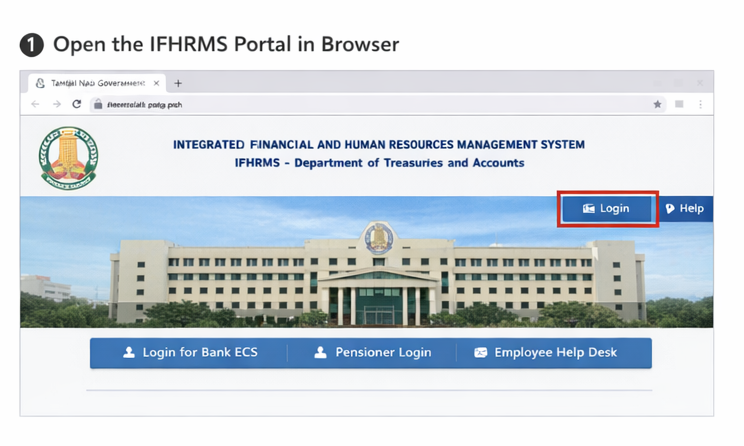
Step 2: Click on Login
On the homepage, click the Login button.
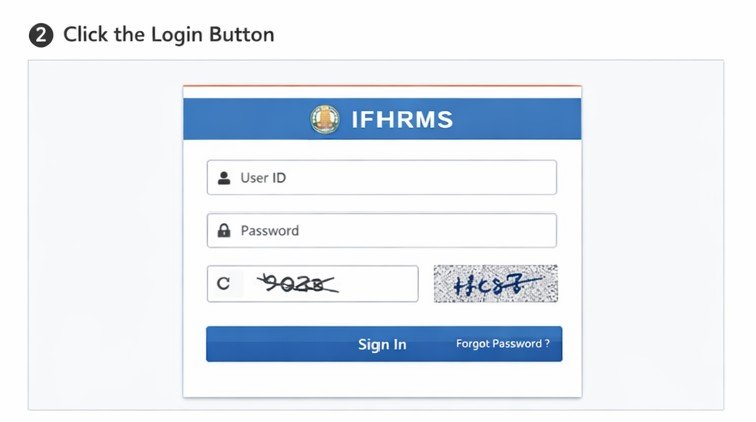
Step 3: Enter Login ID and Password
Enter:
- User ID
- Password
- Captcha
- Then click Sign In.
Step 4: Access Employee Dashboard
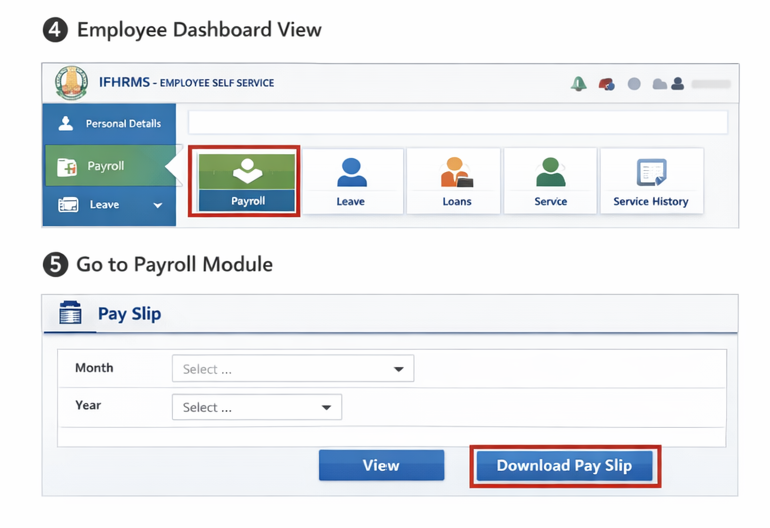
After login, you will see the Dashboard Menu with different modules.
How to Download IFHRMS Pay Slip
After successful login:
Step 1: Open the Website
First, open the IFHRMS website on your mobile or computer using any browser.
Step 2: Go to Login Page
On the homepage, click on the “Login” option to go to the login page.
Step 3: Enter User ID & Password
Put your ID and Password and click Sign In.
Step 4: Go to Payroll/Finance Section
After login, open the Payroll or Finance section where salary details are available.
Step 5: Select the Month
Choose the month for which you want to download the pay slip.
Step 6: Download the Pay Slip
Click Download or Pay Slip to save the PDF on your device.
What Information is shown in a pay slip?
A TN government pay slip from the IFHRMS website shows many important details like:
- Employee details: Basic employee details like name, ID, job, and office.
- Service details: Service details like GPF/CPS number and DDO.
- Earnings: Basic salary, DA, HRA, TA, and other allowances.
- Deductions: GPF/CPS cuts, professional tax, loan EMI (house, festival, vehicle), and income tax.
- Net salary: Final amount paid to the employee after all deductions.
- Bank details: Bank details like bank name and account number.
- PF or NPS
- Income tax
This pay slip is useful for many things, such as:
- Keeping personal salary records
- Applying for loans
- Getting income certificates
- Filing income tax
- Showing employment proof
Forgot Password? How to Reset?
If you forget your IFHRMS password:
- Open login page
- Click Forgot Password
- Enter User ID
- Verify mobile/email
- Set a new password
If details are not updated, you must contact your DDO or Pay Manager.
Common Login Errors and Solutions
1.Incorrect login details
Many users enter the wrong ID or password.
Solution: Check spelling, numbers, and case (capital/small letters). Reset password if needed.
- Type correctly
- Do not use Caps Lock
- Change password if you forgot it
- Page Not Loading
- The Internet may be slow
- Try Chrome or another browser
- OTP Not Received
- Check network
- Check registered mobile/email
- Account Locked
- Wait for 30–60 minutes
- Contact the Pay Office if urgent
Advantages of the IFHRMS Portal
- Easy Salary Access
Employees can quickly check their salary details online and download their pay slip anytime. Helps for tax, loan, or record work.
- No Office Visit Needed
Employees don’t have to go to the office just for salary or pension details. Everything is online, which saves time, travel costs, and energy for everyone.
- Fast Processing
Salary and pension work gets done quickly on the portal. Before it was slow because work was manual. Now it is faster with less delay.
- Less Paperwork
All salary records are stored online, so there are fewer physical files and papers. It makes work cleaner and easier to manage than old paper-based methods.
- Works 24/7
The IFHRMS portal is available day and night, so users can log in anytime. This helps people who cannot visit offices during working hours.
- Useful for Pensioners
Pensioners can check pension at home. No long lines or office visits.
IFHRMS For Pensioners
Website: epension.karuvoolam.tn.gov.in
This website is only for pensioners.
They can download:
- Pension slip
- Pension status
- PPO information
IFHRMS Helpline Support
If employees have any problems, they can get help from:
- Department office
- Treasury office
- DDO/PAO
- HR manager
Conclusion
IFHRMS helps Tamil Nadu Government employees to see their salary details and download pay slips online. Employees do not need to visit the office. They can quickly check salary information and download pay slips in PDF format anytime. The system is safe, fast, and saves time for many employees in the state.
FAQ
- What is IFHRMS?
It is an online finance and HR system used by Tamil Nadu Government.
- Who can login to IFHRMS?
TN Government employees and finance officials.
- Is online pay slip download available?
Yes, pay slip can be downloaded anytime.
- Do I need a password to login?
Yes, User ID and Password are required.
- Can I reset IFHRMS password?
Yes, using the “Forgot Password” option.
- What if I don’t know my User ID?
Ask your Pay Office or DDO.
- Is IFHRMS available for pensioners?
Yes, on a separate portal.
- Which device can I use?
Computer, laptop, or mobile phone.
- Can I use IFHRMS for tax filing?
Yes, pay slip helps in tax calculation.
- Can I download previous month pay slips?
Yes, based on availability.