

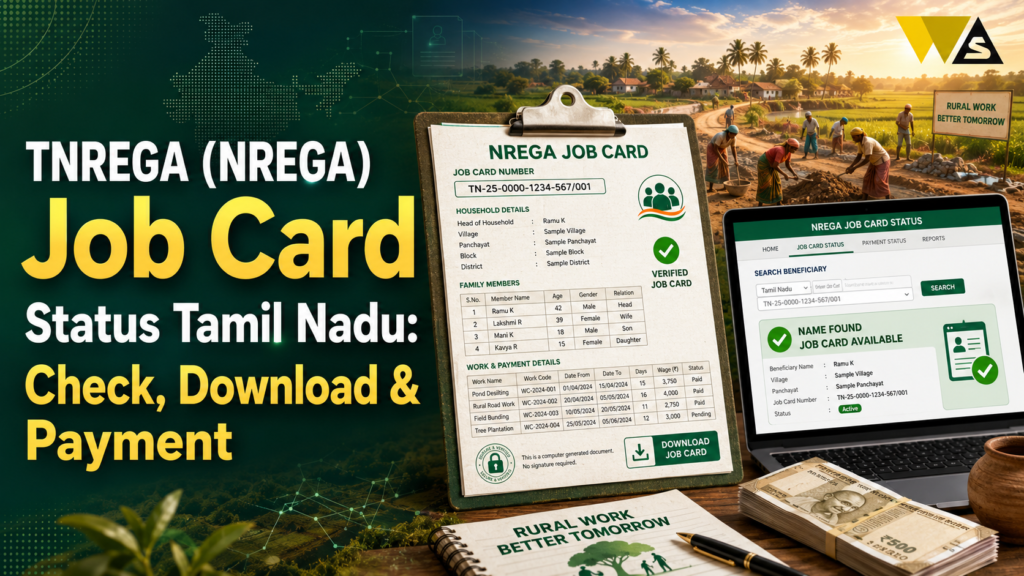
To check your TNREGA (NREGA/MGNREGA) job card status in Tamil Nadu, go to the official portal nrega.dord.gov.in (or the new VB-GRAMG portal, vbgramg.dord.gov.in), open Reports → select State (Tamil Nadu) → District → Block → Gram Panchayat → Financial Year, then click “Job Card / Employment Register”. Your job card number, name, and status appear in the list — click the job card number to see full details (family members, work history, and payments). It is free and needs no login.
The MGNREGA job card gives every rural household 100 days of guaranteed work per year, at Tamil Nadu’s notified daily wage (around ₹319, confirm the current rate). Wages must be paid within 15 days of work — if delayed, you are entitled to delay compensation.
Table of Contents
ToggleTNEGA vs TNREGA : Clearing the Confusion
Many people search for “TNEGA Job Card,” but there is some confusion about the name. Here is what you need to know first.
- TNEGA = Tamil Nadu e-Governance Agency — the body that runs e-Sevai centres, CAN, and online citizen services. It does not issue job cards.
- TNREGA / NREGA / MGNREGA = the Mahatma Gandhi National Rural Employment Guarantee Act — the rural employment scheme that issues the job card giving 100 days of guaranteed work.
So the “job card” you are looking for is the NREGA / MGNREGA job card (often called TNREGA in Tamil Nadu).
If you want a job card for rural work, you want the NREGA/MGNREGA (TNREGA) job card — not a “TNEGA” card, which does not exist.
What is a NREGA/MGNREGA Job Card?
The MGNREGA job card is an official document that proves a rural household is registered under the Mahatma Gandhi National Rural Employment Guarantee Act (MGNREGA).
What the job card gives you:
- 100 days of guaranteed work per household, every financial year.
- Unskilled manual work in your local area.
- Wages paid directly to your bank/post office account.
- Employment within 15 days of applying for work (or an unemployment allowance if not given).
What the job card shows:
- The job card number (your unique ID)
- The household head and family members registered
- The photograph of members
- The work done and days worked
- The wages/payments received
- The bank account (masked) for wages
TNREGA Job Card Status Overview 2026
| Detail | Information |
| Scheme | MGNREGA (NREGA / TNREGA) |
| Benefit | 100 days guaranteed work per year |
| Main Portal | nrega.dord.gov.in |
| New Portal | vbgramg.dord.gov.in (VB-GRAMG) |
| Check By | State → District → Block → Panchayat |
| Login needed? | No |
| Cost | Free |
| Daily Wage (TN) | Around ₹319 (confirm current) |
| Wage Payment Rule | Within 15 days of work |
| Delay Benefit | Delay compensation if wages late |
How to Check TNREGA Job Card Status Online (Step-by-Step)
You can check your job card status and see the full list for your Gram Panchayat. Follow these steps:
Step 1: Open the official portal nrega.dord.gov.in (or the new vbgramg.dord.gov.in).
Step 2: Go to the “Reports” section (or “Key Features → Reports”).
Step 3: Select State → choose Tamil Nadu.
Step 4: Select your District.
Step 5: Select your Block.
Step 6: Select your Gram Panchayat.
Step 7: Choose the Financial Year (for example, 2026–2027).
Step 8: Click “Job Card / Employment Register” (usually under the R1 Job Card / Registration section).
Step 9: The full job card list appears with the job card number, applicant name, and status.
Step 10: Click your job card number to open the full details family members, work history, payments, and bank details.
How to Find Your Job Card Number
If you have forgotten your job card number, you can find it from the same list:
- Follow the steps above to open the Job Card / Employment Register for your Gram Panchayat.
- The list shows all job card numbers with names.
- Find your name (use Ctrl+F to search), and note the job card number next to it.
- Click it to confirm your details.
How to Check Your Job Card Details and Work History
Clicking your job card number opens the full record, which shows:
- Household head and members registered
- Photograph of the members
- Registration date
- Work demanded and work given (with dates)
- Number of days worked in the year
- Muster roll / attendance details
- Wages earned and paid (work by work)
- Masked bank account for wage credit
How to Check NREGA Job Card Payment / Wage Status
Checking whether your wages are paid is one of the most important uses:
- Open the Job Card / Employment Register for your Gram Panchayat (steps above).
- Click your job card number.
- Look at the work-by-work payment details each work shows the wages due and paid.
- The record shows whether the payment is credited, and the masked bank account it went to.
The 15-day wage rule: Under MGNREGA, wages must be paid within 15 days of the work being completed.
Delay compensation: If your wages are delayed beyond 15 days, you are entitled to delay compensation (a small percentage per day of delay) under the MGNREGA Act.
How to Download the TNREGA Job Card (PDF)
You can download or print your job card easily:
- Open your job card details (by clicking your job card number in the list).
- Your full job card with photo, members, and details is displayed.
- On a computer: press Ctrl + P, then choose “Save as PDF” in the destination, and Save.
- On a mobile: open the Share/Print menu and choose “Print as PDF” or “Save as PDF”.
- You can also directly print the job card.
How to Apply for a New NREGA/MGNREGA Job Card
If you do not have a job card yet, here is how to apply:
Who can apply:
- Any adult member of a rural household in Tamil Nadu.
- Willing to do unskilled manual work.
How to apply:
- Visit your Gram Panchayat office.
- Submit an application (written or on the prescribed form) with:
- Names and details of adult household members
- Aadhaar and photographs
- Bank/post office account details
- Address/residence proof
- The Panchayat verifies your household.
- On approval, your job card is issued usually within about 15 days.
- Once you have the card, you can demand work, and you should get it within 15 days (or an unemployment allowance).
Note: Some states/areas allow online or app-based registration (for example, through the NREGA/UMANG app or the Gram Panchayat). Check the current option for your area.
What to Do if Your Name is Not in the Job Card List
If you cannot find your name in the list, here are the reasons and solution:
- Wrong Panchayat/Block selected: Re-check and select the correct district, block, and Gram Panchayat.
- Wrong financial year: Try a different year.
- Card not yet issued: Your application may still be under process check with the Panchayat.
- Name removed/deleted: Cards are sometimes deleted (duplicate, migration, death) — ask the Panchayat office for the reason.
- Not registered: You may need to apply.
Common Problems and Solutions
- Job card list not opening: Try again later, or use the new VB-GRAMG portal (vbgramg.dord.gov.in ).
- Name not found: Check the correct Panchayat and year; use Ctrl+F.
- Wages not paid: Check the payment details; if delayed beyond 15 days, ask about delay compensation.
- Work not recorded: Raise it with the Panchayat with your work proof.
- Job card number forgotten: Find it in the Gram Panchayat list.
- Card wrongly deleted: Visit the Panchayat/Block office to restore it.
- Someone asking for money: The job card and its services are free, do not pay a bribe.
Your Rights Under MGNREGA
- 100 days of guaranteed work per household each year.
- Work within 15 days of demanding it or an unemployment allowance.
- Wages within 15 days of work or delay compensation.
- Work within 5 km of your home (or extra wages if farther).
- Basic worksite facilities (water, shade, first aid).
- Equal wages for men and women.
- Right to information you can check records and file complaints/RTI.
MGNREGA is a legal guarantee, not a favour you have the right to work, timely wages, and compensation for delays.
Beware of Scams and Fake Websites
Because many people search for job cards, scammers create fake sites and agents. Stay safe:
- Job card checking, downloading, and applying are FREE and never pay a fee.
- Use only the official portals (nrega.dord.gov.in / vbgramg.dord.gov.in ) and your Gram Panchayat office.
- Never share your bank OTP or Aadhaar OTP with any “agent”.
- Beware of fake websites or apps asking for a fee or personal details.
- No agent can get you a job card faster for money — it goes through the Panchayat.
If cheated: report to the police / cyber crime helpline 1930 / cybercrime.gov.in .
Conclusion
The TNREGA (NREGA/MGNREGA) job card is your guarantee of 100 days of rural work each year in Tamil Nadu, with wages paid directly to your bank. To check your job card status, go to nrega.dord.gov.in (or the new vbgramg.dord.gov.in), open Reports, select Tamil Nadu → District → Block → Gram Panchayat → Financial Year, and click “Job Card / Employment Register” — then click your job card number for full details, work history, and payments. It is free and needs no login.
A Job Card allows eligible households to get up to 100 days of work in a financial year. Wages are normally paid within 15 days, and compensation may be available for delays. You can check your Job Card Number, payment status, and download the PDF online. If you do not have a Job Card, apply at your Gram Panchayat with Aadhaar, photos, and bank details.
Frequently Asked Questions (FAQs)
1. What is a TNREGA/NREGA job card?
A Job Card is an official document for rural households registered under MGNREGA. It helps eligible families get up to 100 days of unskilled work in a financial year. Wages are paid to the registered bank account. In Tamil Nadu, it is commonly called the TNREGA Job Card. TNEGA is a different government agency and does not issue this Job Card.
2. How do I check my TNREGA job card status online?
Go to nrega.dord.gov.in (or vbgramg.dord.gov.in), open Reports, select Tamil Nadu → District → Block → Gram Panchayat → Financial Year, and click “Job Card / Employment Register”. Your job card number, name, and status appear; click the number for full details. No login is needed.
3. Is checking the NREGA job card free?
Yes. Checking your job card status, viewing details, and downloading the PDF on the official portal are completely free and need no login. If any website or agent asks for a fee, it is a scam.
4. How do I find my NREGA job card number?
Open the Job Card list for your Gram Panchayat. Search for your name and check the Job Card Number next to it. You can use Ctrl+F on a computer to find your name quickly. Click the number to view your details.
5. How do I check my NREGA wage/payment status?
Open your job card details by clicking your job card number in the list. It shows the work-by-work payment details, wages due and paid, and the masked bank account. Wages must be paid within 15 days of work.
6. What if my NREGA wages are delayed?
Under MGNREGA, wages must be paid within 15 days of completing the work. If they are delayed beyond 15 days, you are entitled to delay compensation. Raise the issue with your Panchayat/Block office and ask about the compensation.
7. How do I download my TNREGA job card?
Open your job card details on the portal, then press Ctrl+P and choose “Save as PDF” on a computer, or use the Share/Print menu and choose “Print as PDF” on mobile. You can also print the job card directly.
8. How do I apply for a new NREGA job card in Tamil Nadu?
Visit your Gram Panchayat office and submit an application with the names of adult household members, Aadhaar, photographs, bank account details, and address proof. After verification, the job card is usually issued within about 15 days. Some areas also allow app-based registration.
9. My name is not in the job card list. What should I do?
Check that you selected the correct district, block, Gram Panchayat, and year. If it is still missing, your card may be under process, deleted, or not registered. Visit your Panchayat/Block office to check the reason or to apply/restore it.
10. What is the NREGA daily wage in Tamil Nadu?
The daily wage is set by the central government and revised each financial year (around April). For Tamil Nadu it is approximately ₹319 per day, but always confirm the current wage on the official portal, as it changes.
Read our article:
Read our article:
Read our article:
Read our article:
Read our article:
Read our article:









