

A Permanent Account Number (PAN) plays an important role in managing financial activities. After you apply for a PAN card, waiting for it can feel a little stressful. Checking your PAN card status is quick and easy.
You can check your PAN card status in different ways, like using the Protean eGov Technologies or UTI Infrastructure Technology and Services Limited websites.
These methods help you save time and avoid waiting. Usually, it takes about 15 to 20 days to get your PAN card. Sometimes, it may take longer if the details are wrong or incomplete. In this article, you will get to know simple methods to check your PAN card status and receive it quickly.
Requirements to find your PAN using your mobile number
Before you know your PAN card status using your mobile number, you should have your acknowledgment or token number. This number is given by Protean eGov Technologies, UTI Infrastructure Technology and Services Limited, or your agent when you apply for a PAN card.
You get a 15-digit acknowledgment number after applying for PAN or making changes. Keep it ready to check your PAN status on your mobile.
| Requirement | Details |
| Acknowledgment/Token Number | You must have your acknowledgment or token number to check PAN status. |
| Issued By | Provided by Protean eGov Technologies, UTI Infrastructure Technology and Services Limited, or your agent. |
| Number Type | It is a unique 15-digit number. |
| When You Get It | You receive it after applying for a new PAN or making changes to your PAN. |
| Purpose | It helps you check your PAN card status using your mobile number. |
How to Check Pan Card Status by Using Your Mobile Number
Once you submit your PAN card application and get the acknowledgment number, you can check its status using your mobile number in the following ways.
Method 1: Check the PAN card status by SMS
You can easily know your PAN card status through SMS. Follow these steps:
- Type an SMS with your 15-digit acknowledgment number.
- Send the message to 57575 (NSDL PAN service).
- In a few seconds, you will receive an SMS showing your PAN card status.
Method 2: Check PAN card status via phone
Another easy way to check your PAN card status is by phone. Follow these steps:
- Call 020-27218080 to reach the Tax Information Network customer care helpline.
- Share your acknowledgment number with the customer care executive.
- After a quick check, they will tell you your PAN card status.
Note: The SMS number and helpline number may change. Always check the official website before calling or sending a message.
Method 3: Check PAN Card Status Online on Mobile
You can check your PAN status online on your mobile using the Protean eGov Technologies website. Follow these steps:
- Open the “Track PAN/TAN Application Status” page.
- Select “PAN – New/Change Request” as your application type.
- Enter your acknowledgment number.
- Type the captcha code shown on the screen.
- Click on “Submit” to check your PAN card status instantly.
This method is quick and works easily on your mobile phone.
Check the PAN Card Status on NSDL Website
Step 1: Open the official Tax Information Network (NSDL) website: https://nsdl.co.in/ in your browser.
Step 2: From the drop-down menu, select “PAN – New/Change Request” as your application type.
Step 3: Select “Acknowledgement Number”, type your acknowledgment number and captcha code, then click “Submit” to check your PAN application status on the screen.
Note: You can check your PAN card application status online 24 hours after submitting your application.
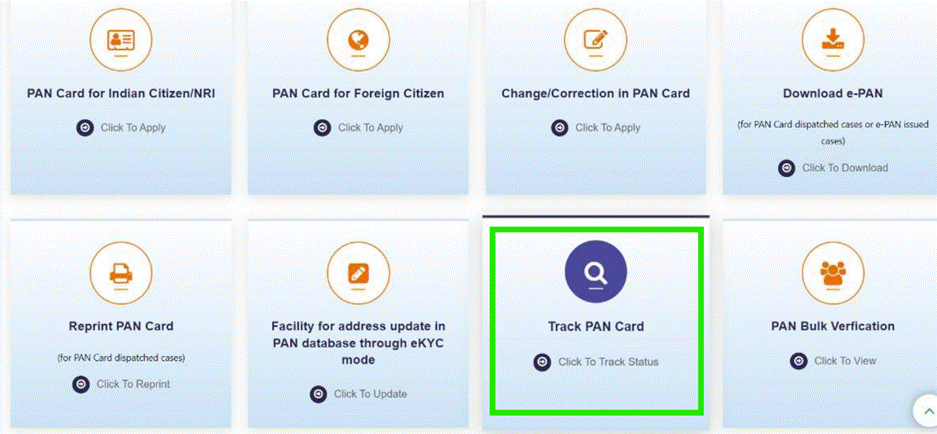
Know your PAN Card Status on UTI website
Step 1: Open the UTI Infrastructure Technology and Services Limited website in your browser.
Step 2: search and Click on the “Track PAN Card” option.
Step 3: Type your application/coupon number and date of birth, then click “Search” to check your PAN application status on the screen.
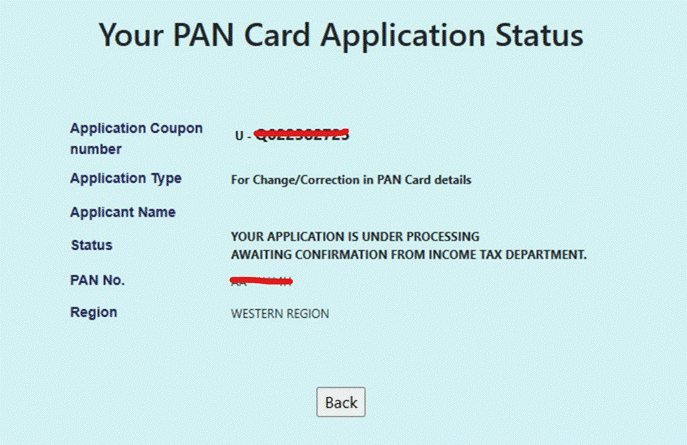
How to Check PAN Status with Acknowledgement Number?
If you applied for a PAN card on the Protean eGov Technologies website, you can check your PAN card status only on the same website using your acknowledgment number.
In the same way, if you applied through the UTI Infrastructure Technology and Services Limited website, you can check your PAN card status there using your acknowledgment number.
Check PAN Card Status Without an Acknowledgement Number
Protean eGov Technologies (earlier known as TIN-NSDL) provides an easy way for users to check their PAN card status online. You can track the status of a new or duplicate PAN card, even without an acknowledgment number.
Follow these steps to know your PAN status with your name and date of birth:
Step 1: Visit the official Protean eGov Technologies (TIN-NSDL) website.
Step 2: Go to the “Application Type” section and select “PAN – New/Change Request”.
Step 3: Choose “Name” and fill in your name and date of birth.
Step 4: Press the “Submit” button to view your PAN card status.
How to Find PAN Card Status Using Your Name and Date of Birth?
On the Protean eGov Technologies website, you can check your PAN status without an acknowledgment number. Just use your name and date of birth.
- Visit the Protean eGov Technologies website to check your PAN status.
- In the “Application Type” section, select “PAN – New/Change Request”.
- Select the “Name” option and enter your last name, first name, and middle name exactly as mentioned in your application form.
- Enter your date of birth. For other applicants, enter the date of incorporation, partnership, or agreement.
- Press the “Submit” button to continue.
- The system will display your PAN card status on the screen. You can use the name and date of birth option after 24 hours of submitting your application online.
Steps To Check e-PAN Card Status
e-PAN is a digitally signed PAN card issued in electronic form. It uses your Aadhaar e-KYC information. You will receive your PAN in PDF format at no cost. e-PAN is equal to a physical PAN card.
To get it, you need your Aadhaar details and a mobile number linked to Aadhaar.
Steps to Check e-PAN Status Using Aadhaar Number:
- Open the e-filing website of the Income Tax Department.
- Find the “Check Status/Download PAN” option and click “Continue”.
- Enter your 12-digit Aadhaar number in the given field.
- Press the “Continue” button to proceed.
The system will display your PAN card details on the screen. Make sure your mobile number is linked with Aadhaar to receive the OTP for verification.
How to Check PAN Payment Status?
If you have applied for a PAN card and made the payment through a credit card, debit card, or internet banking, you can check your PAN payment status by following the steps below.
- Open the Protean eGov Technologies (NSDL) website.
- From the “Services” tab, select the “PAN” option.
- Select “Know Status of Your Credit Card/Debit Card/Net Banking Transaction for Online Application” to check your payment status.
- Enter your transaction number or the 15-digit acknowledgment number in the given field.
- Enter your name and date of birth. If you are not an individual, enter the relevant date such as incorporation, partnership, or agreement date.
- Press the “Show Status” button to check your status.
The system will display your payment status details on the screen.
How to Track PAN Card Delivery Using India Post?
After your PAN card is processed, you will get a message with a consignment number by SMS or email. You can use this number to track your PAN card delivery.
Follow these steps:
- Step 1: Visit the India Post tracking website.
- Step 2: Enter your consignment number in the box.
- Step 3: Fill the captcha code and click on “Track Now”.
- Step 4: You will see the current location and delivery status of your PAN card on the screen.
Conclusion
Checking your PAN card status is simple and can be done in many ways like online websites, SMS, phone calls, or using Aadhaar details. You can track your application using your acknowledgment number, name and date of birth, or even your mobile number.
PAN cards usually come in 15–20 days. Delays can happen if details are incorrect. Always give correct details to get your PAN on time.
Frequently Asked Questions
1. How can you check your PAN card status online?
Go to the Protean eGov Technologies or UTI Infrastructure Technology and Services Limited website. Enter your details to check your PAN status.
2. How many days does it take to get a PAN card?
Usually, it takes around 15 to 20 days to receive your PAN card. However, it may take longer if there are errors or missing details in your application.
3. Can I check PAN card status without an acknowledgment number?
Yes, you can check your PAN card status without an acknowledgment number by using your name and date of birth on the Protean eGov Technologies website.
4. How can I check PAN card status using my mobile number?
You can check your PAN status using your mobile by sending an SMS with your acknowledgment number or by calling the helpline provided by the Tax Information Network.
5. What is an acknowledgment number in a PAN application?
The acknowledgment number is a unique 15-digit number given after applying for a PAN card. It is used to track your PAN application status.
6. Can I check my PAN card status using my Aadhaar number?
Yes, you can check your e-PAN status using your Aadhaar number on the Income Tax Department e-filing website.
7. What should I do if my PAN card is delayed?
If your PAN card is delayed, Know your application status online. Make sure all details are correct. If needed, contact customer support or re-submit the correct information.
8. How can I track PAN card delivery?
You can easily track your PAN card delivery by entering your consignment number on the India Post website.
9. Is e-PAN valid like a physical PAN card?
Yes, e-PAN is the same as a physical PAN card. You can use it for all financial purposes.
10. Can I check PAN payment status online?
Yes, you can check your PAN payment status on the Protean eGov Technologies website using your transaction number or acknowledgment number.
Read our article:PAN Card Correction Form: How To Make Correction In PAN Card Online?









