


Buying land in Haryana? First check Jamabandi records to avoid fraud. Haryana Jamabandi Nakal Online is an important service started by the Haryana Government to give land information on the internet. With Jamabandi, you can easily check details of your land in Haryana from anywhere and at any time. The website also helps you understand how to get and manage your land records.
Land records show details like owner name, land size, ownership type, and other information. This helps people check land details without visiting the revenue office.
What is Jamabandi?
Jamabandi, also called the ‘Record of Rights,’ plays an important role in keeping land records in Haryana. The government has made Jamabandi digital so that people can easily find land information online. This system helps provide clarity, reduces errors in land data, and prevents cheating or fraud related to land ownership.
What is Jamabandi Haryana?
Jamabandi Haryana is an online land record system of Haryana. It helps people check land details like ownership, area, and type of land.
Through the Jamabandi portal, you can easily see records like Khasra, Khatauni, and land ownership details. It is managed by the Haryana government and makes land information easy to access online.
This system is useful for checking property details, buying or selling land, and avoiding fraud.
Jamabandi Haryana Details:
| Feature | Details |
| State | Haryana |
| Purpose | Check land records online |
| Information Available | Owner name, land details, Khasra, Khatauni |
| Managed By | Haryana Government |
| Use | Property verification, legal work |
What is Jamabandi Haryana land records?
Jamabandi Haryana is an important land record document in Haryana. It shows clear details about who owns the land, who uses it, and how the land is cultivated. For people applying for a home loan, it is important to know the land details and legal status. Jamabandi helps banks check who owns the land and whether the land already has any loan, mortgage, or legal issue on it.
What is Jamabandi Haryana Nakal?
The Haryana Jamabandi Nakal, also called the Record of Rights (RoR), is an important document that shows who owns the land, how the land is used, and what rights are linked to it. It is updated every five years by the Patwari and approved by the Revenue Officer.
The document shows details such as the landowner’s name, ownership changes (mutations), size of the land, how the land is used for farming, and if there are any legal claims on the land.
Jamabandi Nakal is important for buying or selling property, taking loans, and solving land disputes in Haryana.
Details Available in Jamabandi Nakal-
| Detail | What It Means |
| Owner Name | Name of the land owner |
| Khasra Number | Unique number of the land |
| Khata/Khatauni | Account details of land records |
| Land Area | Total size of the land |
| Land Type | Agricultural or non-agricultural |
| Revenue Details | Land tax or lagaan details |
| Possession Details | Who is using the land |
| Mutation Details | Changes in ownership |
What is the Khewat Number?
The Khewat Number is also called the Khata Number by revenue officials. It is an account number given to land owners who share the land together, either equally or in different shares.
In the Jamabandi, Khewat Numbers are listed in order from 1 to any number (1 to N).
The Khewat Number can change in the next Jamabandi because records may be rearranged. This means the same owners may get a new Khewat Number in the next update.
What is the Khasra Number?
The Khasra number is a plot number given to a specific piece of land in a village. Sometimes a Khasra number gets divided when land is sold, gifted, or transferred.
When this happens during mutation, the original Khasra number gets new numbers with a denominator.
For example, if Khasra number 100 is divided into two parts, it becomes 100/1 and 100/2 after mutation.
How to get Nakal?
To get a Nakal, you must submit an application at the HALRIS centre in the Tehsil or Sub-Tehsil office. The computer operator will prepare the Record of Rights (Nakal) for the required Khewat number and take a printout.
The Patwari at the HALRIS centre will check the Nakal, sign it, and record it in the Nakal register. The Patwari will take the Nakal fee (₹30), give you a receipt, and then hand over the Nakal to you.
Features of Haryana Jamabandi
The Haryana Jamabandi portal has useful features that make it easy to check and manage land records online:
- Digital Land Records: Allows users to view land documents online instead of visiting offices.
- Mutation Tracking: Helps users check the current status of ownership change (mutation) applications.
- Ownership Verification: Makes it easy to verify who owns the land.
- Dispute Resolution: Helps solve land-related issues more quickly by providing clear and updated records.
- GIS Integration: Uses GIS maps to show accurate land boundaries and information on digital maps
Jamabandi Haryana Portal Details
Jamabandi Haryana is an online service created by the Government of Haryana to manage land records. On the website jamabandi.nic.in, people can see land information, ownership details, and other land-related services from home.
Jamabandi Haryana Uses
Jamabandi Haryana is an important land record document. It is used for many purposes like loans, property work, and legal cases.
- Loan Application: You can use Jamabandi Nakal to apply for a loan. Banks check land ownership details before giving a loan. It works as proof that you own the land.
- Property Verification: Before buying or selling land, you can check Jamabandi records. It helps confirm the real owner and avoids fraud.
- Legal Work: Jamabandi Nakal is also used in legal cases related to land. It helps as proof in court for ownership and land details.
| Use | Why It is Important |
| Loan application | Helps get loan using land as proof |
| Property verification | Confirms ownership and avoids fraud |
| Legal work | Used as proof in court |
Online Jamabandi Haryana Portal Services
This portal gives a faster, easier, and more transparent way to see and manage land records. It offers many helpful services such as:
- Check Jamabandi Nakal
- See mutation orders and their status
- Check collector rates, stamp duty, and registration charges
- Use a calculator to know stamp duty amount
- View land maps
- See registration deeds
- Check revenue court orders
- Book appointment for deed registration
Benefits of Jamabandi Haryana Portal
Online access: Bhulekh Haryana lets people check land records online from anywhere.
Real-time updates: Land record changes are updated instantly on the platform.
Easy to use: It is easy to use the website, and information is easy to find.
Safe data: The portal keeps information secure and protects user privacy.
Convenient: No need to go to government offices to check land records.
Transparent: Shows correct and updated property details, helping avoid disputes.
Saves time: Checking records and applying for updates takes less time and effort.
Jamabandi Haryana Login Process
You can log in to the Jamabandi Haryana portal to check land records and related details online.
Step-by-Step Login Process
- Go to the official Jamabandi Haryana website
- Click on the “Login” option
- Enter your User ID and Password
- Fill the captcha code
- Click on the Login button
- After login, you can access land records and services
Forgot Password-
If you forget your password, click on “Forgot Password” and reset it using your registered mobile number or email.
Note: Always keep your login details safe and secure.
Jamabandi Land Nakal Details Online
Nakal is a copy of land records that shows details like land ownership, revenue, and other important information. Follow these simple steps to get Jamabandi Land Nakal:
Step 01: Go to the official Jamabandi Haryana website.
Step 02: Click on the ‘Jamabandi’ tab and select ‘Jamabandi Nakal for Checking’.
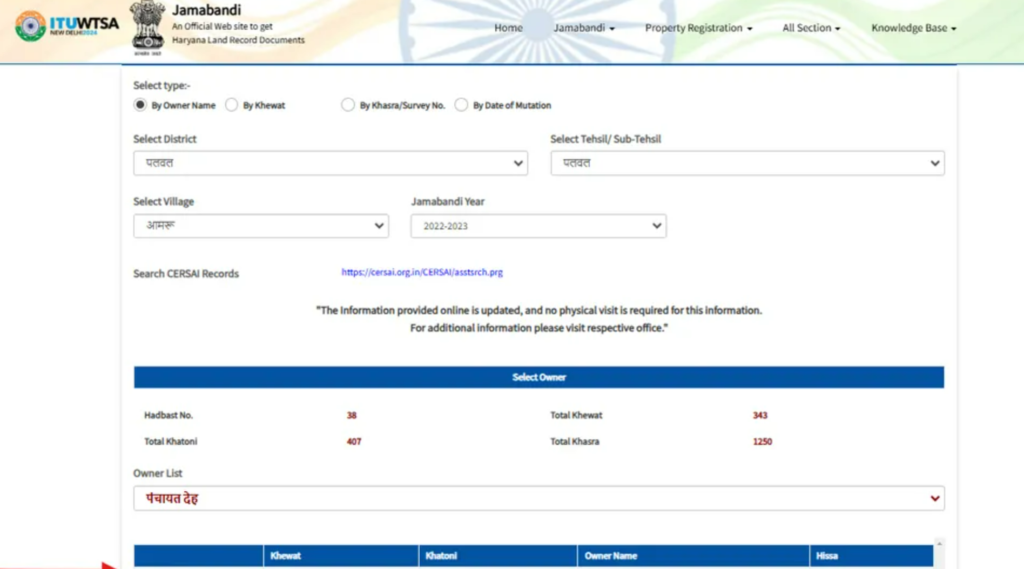
Step 03: Select how you want to search — by owner’s name, Khewat number, Khasra/Survey number, or mutation date.
Step 04: Select the district, tehsil or sub-tehsil, village, and Jamabandi year.
Step 05: Enter the required information to view the Jamabandi Nakal.
How to Download Jamabandi Nakal PDF
You can easily download Jamabandi Nakal PDF online from the Haryana portal. Follow these simple steps:
Step-by-Step Process
- Go to the official Jamabandi Haryana website
- Click on “Jamabandi Nakal” option
- Select your district, tehsil, and village
- Enter details like owner name, Khasra number, or Khata number
- Click on “Search”
- Select the correct record from the list
- Click on “View”
- Download or print the PDF
Note: Check all details carefully before downloading the document.
Required Documents for Deed Registration on Jamabandi Haryana Portal
When you register your deed on the online portal, you must upload some important documents. These include:
- Proof of ownership — like Fard of Jamabandi, certified copy of sale deed, MC assessment, or Mutation papers.
- ID proof of all parties — such as Ration Card, Voter ID, Driving Licence, Aadhaar Card, or PAN Card.
- ID proof of witnesses.
- Power of Attorney documents — if registration is done through a Power of Attorney, including GPA verification.
- No Objection Certificate (NOC) — from DTP under Section 7(A) of the HDRUA Act, 1975.
- Map/plan of the property — showing the immovable property details.
- You must upload a digital picture of the building or land.
- Mutation of Virasat is needed to confirm ancestral property during a release deed.
How to Check Deed Registration Slot Availability on Jamabandi?
To check deed appointment availability on the Jamabandi Haryana website, follow these steps:
Step 01: Go to the Jamabandi Haryana website.
Step 02: Click ‘Property Registration’ and then ‘Check Deed Appointment Availability’.
Step 03: Select your district, tehsil, and number of days.
Step 04: Click ‘Search’ to see available slots.
How to Check Registered Deeds on Jamabandi Portal?
Steps to search a registered deed on the Jamabandi portal:
Step 01: Go to the Jamabandi Haryana website.
Step 02: Click on the ‘Property Registration’ tab.
Step 03: Select View Registered Deeds.
Step 04: Log in with your mobile number.
Step 05: Enter the property details like district, tehsil, registry number, registry date, deed type, etc.
Step 06: Click ‘Search’ to see the registered deed details.
Documents Required for Land Verification
This shows the ownership details of the land. It is the most important document for verification.
Khasra / Khatauni: These documents show land records, area, and usage details.
Sale Deed: This is the legal document of the property. It shows the transfer of ownership.
Mutation Record: It shows the latest ownership update in government records.
Identity Proof: Documents like Aadhaar or PAN are needed to verify the owner’s identity.
Encumbrance Certificate: This shows if there is any loan or legal issue on the property.
Cadastral Map in Jamabandi Haryana
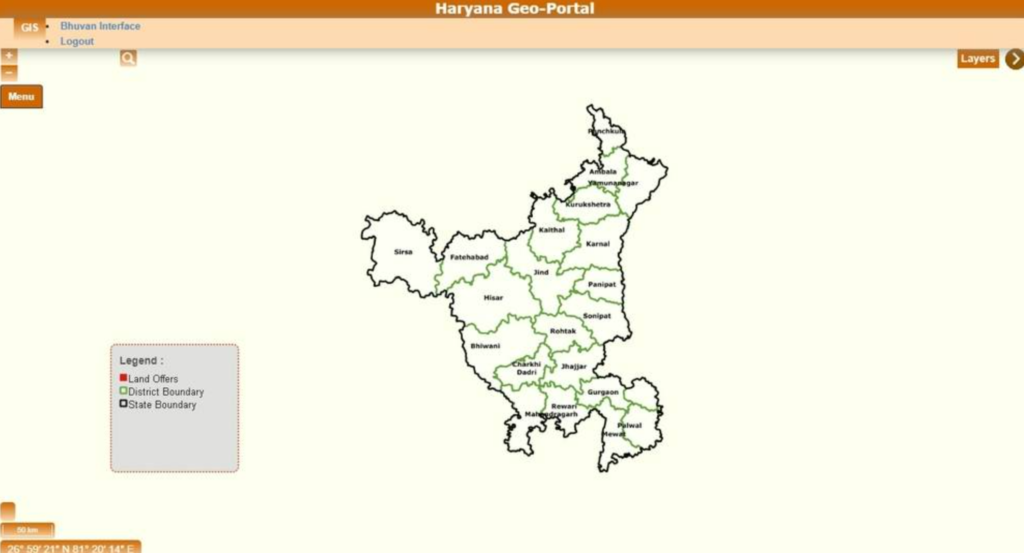
The Jamabandi portal also lets you view your land map online. Follow these steps to open the cadastral map:
Step 01: Go to the Jamabandi portal
Step 02: Click on ‘All Section’
Step 03: Select ‘View Cadastral Maps’
Step 04: You will be taken to the Digital Land Record, Haryana website
Differences between mutation and Jamabandi in Haryana
Many people think Jamabandi and Mutation are the same, but they are different. Jamabandi is the main land record that shows who owns the land and other details. Mutation is the process done when the land ownership changes, for example after buying, selling or inheriting property. After mutation, the new owner’s name is updated in the records. So mutation updates the record, and Jamabandi is the record itself.
Why is it Useful to Check Jamabandi Haryana Online?
- Easy access: It saves time because Jamabandi Haryana records can be checked online without visiting government offices.
- Clear Information: Online land records reduce the chances of fraud because the information is available digitally and cannot be easily altered.
- Accuracy: Since the records are digital, mistakes are less likely, and updates can be done quickly whenever required.
- Improved user convenience: You don’t have to visit government offices anymore. Jamabandi Haryana records can be viewed and downloaded online from home.
- Reduces legal problems: Verifying Jamabandi Haryana online reduces the risk of legal disputes due to wrong or old information.
How to Register an Immovable Property in Jamabandi Haryana?
To register a property in Haryana through the Jamabandi portal, follow these steps:
Step 01: Visit the Jamabandi website
Step 02: Go to the “Deed Templates” section and download the correct deed (such as sale deed or gift deed)
Step 03: Fill the deed form and get it signed by all parties.
Step 04: Buy an E-Stamp from the Haryana E-GRAS portal after calculating fees.
Step 06: On the Jamabandi site, go to Property Registration → Check Deed Appointment Availability, select your district & tehsil, and book a date and time.
Step 07: Collect all required documents.
Step 08: Go to the Sub-Registrar Office on the appointment day with documents and E-Stamp details.
Step 09: The officer will check documents, take biometric details, and register the deed in the HARIS system.
Step 10: You will get a registered copy of the deed.
Step 11: Later, you can also view the registered deed online on the Jamabandi portal.
Loan Against Land in Haryana
You can get a land loan in Haryana by using your land as security. Banks give this loan based on your land value and documents.
A property loan is also available if your land is residential or commercial. It helps you get money for personal or business needs.
Farmers can apply for an agriculture loan using their agricultural land. This loan is useful for farming needs like seeds, equipment, or irrigation.
Banks check your land records, ownership details, and income before giving approval. Having clear documents like Jamabandi Nakal increases your chances of getting the loan.
| Loan Type | Purpose | Who Can Apply |
| Land Loan | Loan against land value | Land owners |
| Property Loan | Personal or business use | Property owners |
| Agriculture Loan | Farming needs | Farmers |
Common Problems & Solutions – Jamabandi Haryana
While checking Jamabandi Haryana records, people may face some common problems. But most of them can be fixed easily if you take the right steps.
- Wrong Owner Name: Sometimes the owner name is incorrect in the record.
Solution: Apply for correction at the local revenue office with valid documents.
- Missing Land Record: In some cases, land details may not be available online.
Solution: Visit the tehsil office and request record update.
- Incorrect Land Details: Details like area or land type may be wrong.
Solution: Submit proof and request correction through officials.
- Pending Mutation: Ownership change is not updated in records.
Solution: Apply for mutation and follow up regularly.
- Website Not Working: Sometimes the Jamabandi portal may not open or load properly.
Solution: Try again later or use a different browser/device.
Conclusion
Jamabandi is an important record that shows who owns the land. It is useful for proving ownership and for solving land-related disputes in India. Today, land records are digital, so checking Jamabandi online has become very easy. This also reduces fraud and makes buying or selling land safer.
With the help of state land record portals, you can quickly get updated information anytime. To stay safe, you should check your land record once or twice a year. You can also keep a digital copy on your computer or phone so that you don’t need to visit government offices again and again.
FAQ
1. What is Jamabandi Haryana and why is it important?
Jamabandi Haryana is an online land record system that shows details like owner name, land size, and land type. It is important because it helps people check land ownership, avoid fraud, and use land documents for loans or legal work.
2. What is Jamabandi Nakal and what information does it contain?
Jamabandi Nakal is a copy of land records. It shows details like owner name, Khasra number, land size, and land type. It also shows any ownership changes. It is useful to check property details and for legal work.
3. How can I check Jamabandi Haryana records online?
You can check Jamabandi records by visiting the official portal. Select your district, tehsil, and village, then search using owner name, Khasra number, or Khata number to view details online.
4. How to download Jamabandi Nakal PDF online?
Go to the Jamabandi Haryana website and click on Jamabandi Nakal. Enter your land details and search. Then select the correct record and download the PDF.
5. What documents are required for land verification in Haryana?
You need documents like Jamabandi Nakal, Khasra/Khatauni, sale deed, mutation record, ID proof, and encumbrance certificate. These help check ownership and any legal issues.
6. Can Jamabandi Nakal be used for a loan?
Yes, Jamabandi Nakal can be used to apply for a loan. Banks check land ownership and legal status before giving a loan. It acts as proof that you own the land.
7. What is the difference between Jamabandi and mutation?
Jamabandi shows who owns the land. Mutation means updating the owner after sale or transfer. After mutation, the new owner name is added in Jamabandi.
8. What problems can occur in Jamabandi Haryana records?
Common problems include wrong owner name, missing records, incorrect land details, or pending mutation. These issues can be fixed by applying for correction at the revenue office.
9. Can I get a loan against land in Haryana?
Yes, you can take a loan using your land. Banks check your documents, income, and land value first.
10. What are the benefits of Jamabandi Haryana portal?
The portal helps you check land records online. It saves time, gives correct details, and helps avoid fraud. You can also use it for property checks, legal work, and loans.









